Electronic personal files in eFOB – benefits and legal aspects
The employer is obliged to establish and maintain documentation for each employee in matters related to the employment relationship and the employee's personal files (employee documentation). From January 1, 2019, companies have the option of keeping such documentation in electronic form, which is equivalent to paper form.
Benefits of maintaining digital employee records in eFOB
An electronic employee records system allows you to optimize the costs associated with storing documentation, shorten the time spent working on documents, save archival space, standardize HR processes and ensure the security of personal data.
- Reducing paper and printing costs - by using an electronic employee records system, you can reduce paper and printing costs, as there is no need to print or store documents in paper form. This saves you money because you don't have to invest in paper, ink or printing costs.
- Reduction of document storage costs - an electronic employee records system allows you to store all documents in one place, which facilitates the management and retrieval of information, and also reduces the costs associated with storing and maintaining office space. Eliminating the need to have shelves, document cabinets and renting rooms reduces expenses related to storing, protecting and transporting documents to the archive.
- Automation of HR processes - an electronic employee records system allows the automation of many HR processes, such as recruitment, training and employee evaluation. This allows you to save time and improve your company's operations. Employees can also complete documents online, which eliminates the need to fill out paperwork manually and speeds up processes.
- Improve efficiency - an electronic employee records system enables faster and easier access to employee documents in the event of handling current employee inquiries. This can speed up HR processes, improve the efficiency of the department's work and increase the satisfaction of employees interested in information, mainly thanks to much faster processing of submitted applications.
- Increased data security – using an electronic employee records system also increases data security. Information is stored in a secure and controlled manner, which minimizes the risk of documents being lost or accessed by unauthorized persons. A good electronic employee records system supports GDPR compliance through access controls, access logging, encryption and secure archiving. All this makes the management of personal data much more secure and compliant with applicable regulations.
Requirements for electronic employee records systems
The regulation on employee documentation specifies exactly what requirements must be met when storing and maintaining documentation in electronic form. The eFOB platform meets these requirements and can be used as a tool for maintaining electronic personal files and employee documentation.1. Permanent access to documentation – only people who have appropriate authorizations can access personal files in folders. 2. Identification of people with access to documentation and recording changes made by them - the eFOB platform allows users to be assigned specific actions thanks to the authorization function. Operation history allows you to control changes made to the documentation. 3. Document Security – eFOB creates backup copies to ensure that your documentation is stored safely. Access to documents is limited only to authorized persons, and only persons with the rights to delete documents can delete documents. 4. Integrity of documentation content and metadata – the system records all operations performed on documents and metadata 5. Efficient search for documents based on metadata - the system allows you to quickly search for documents located in folders based on all metadata listed in the regulation § 13 section 3. 6. Issuing documentation in electronic form - documents with metadata can be easily exported and downloaded in ZIP format. 7. Documentation printing functionality – the system allows you to print documents after downloading or exporting them and opening them on a local computer.
Adding documents to folders
The system allows you to add digitized documents, which were originally in paper form, as well as electronic documents.
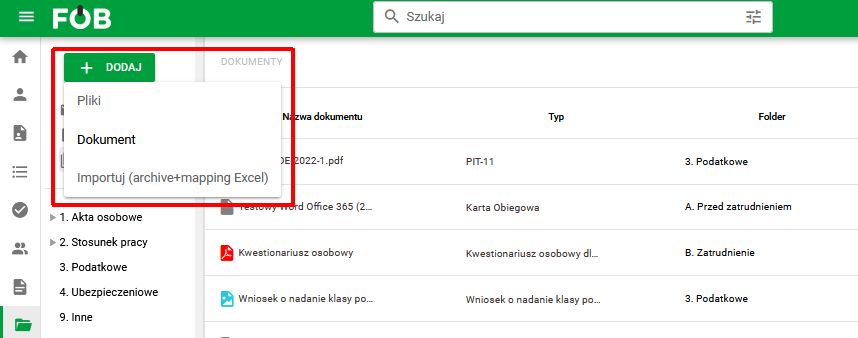
To add a document to eFOB, open the Documents module and select the "Add" option and then select from the options:
– Files – this option allows you to add multiple files, which in the next step can be grouped into collective PDF documents – Documents – option to add a document for an employee, indicating the folder and document type – Import – mass import of documents to eFOB based on a properly prepared xls file.
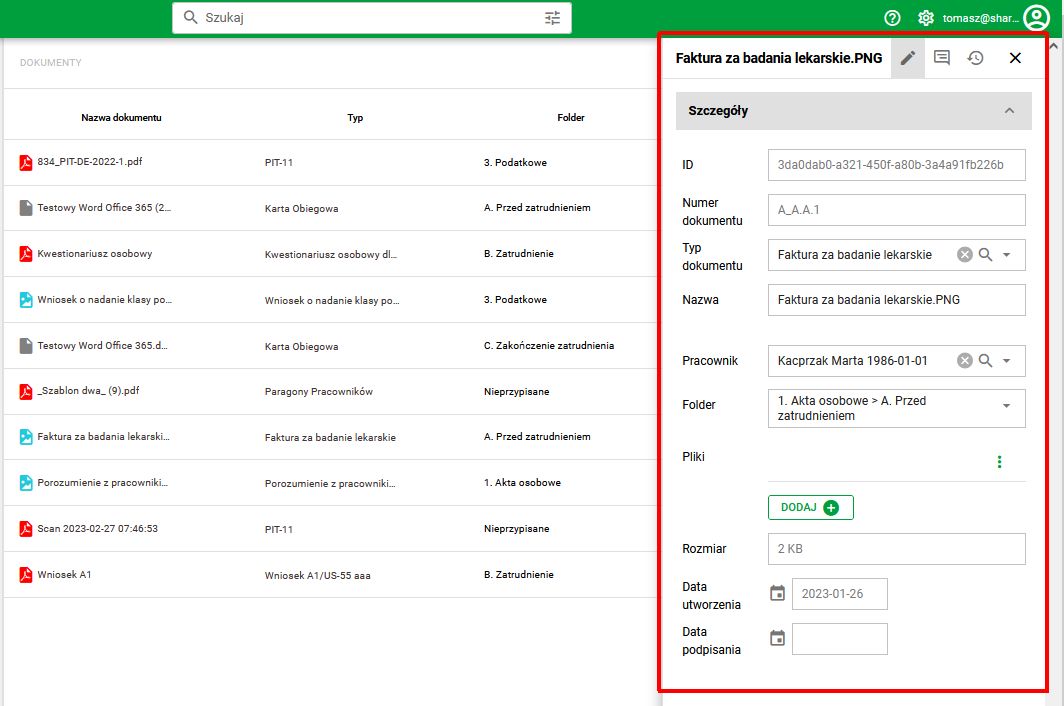
When adding documents, a document number and ID (a unique document identifier in the entire set) are automatically assigned. Preview and editing of metadata is available after selecting a document.
Document search engine
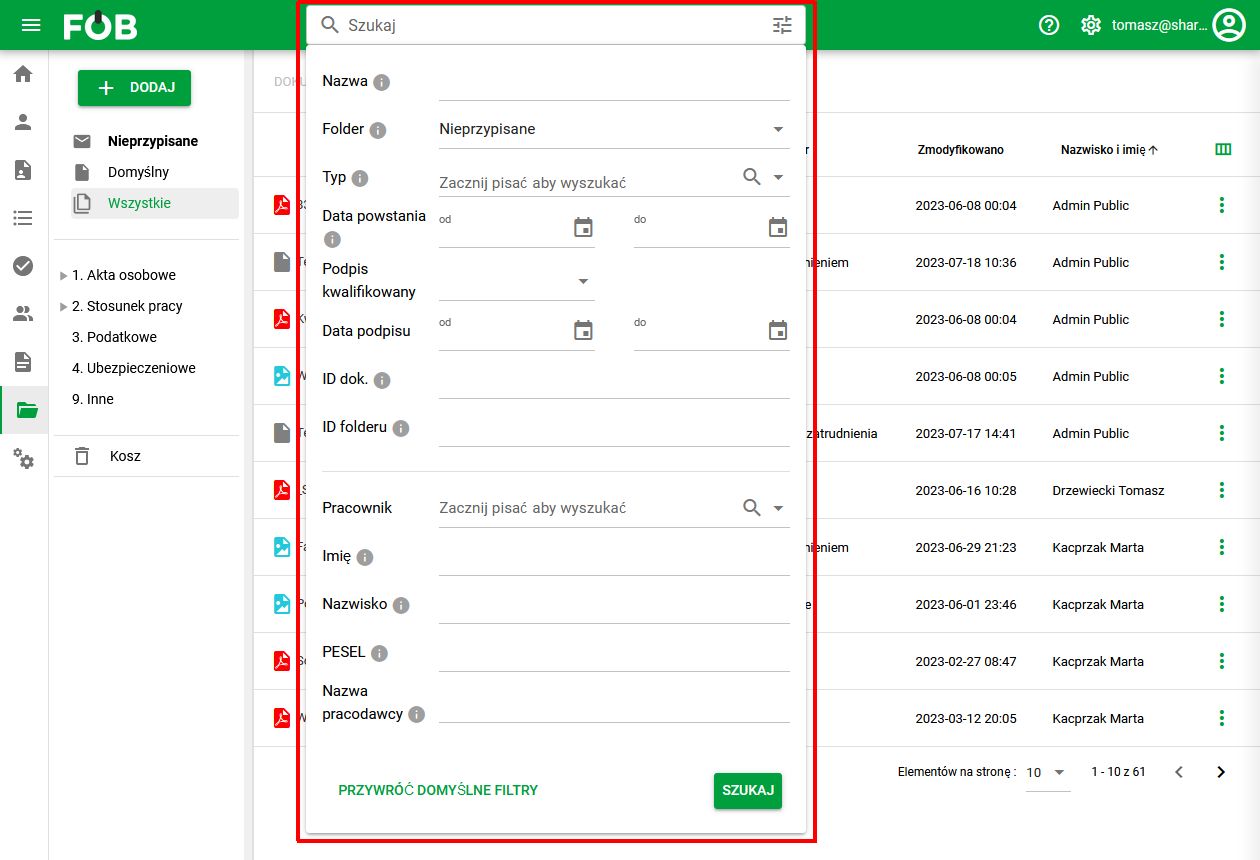
In the eFOB system, all documents have a set of metadata that allows the document to be searched and identified. This ensures that the requirements according to (§ 9. point 5) are met: – document number – documentation identifier – folder and document type – employee's name and surname – date of document creation – date of digital signature – name of the employer.
The advanced eFOB search engine is available on the top bar of the application.
History of changes
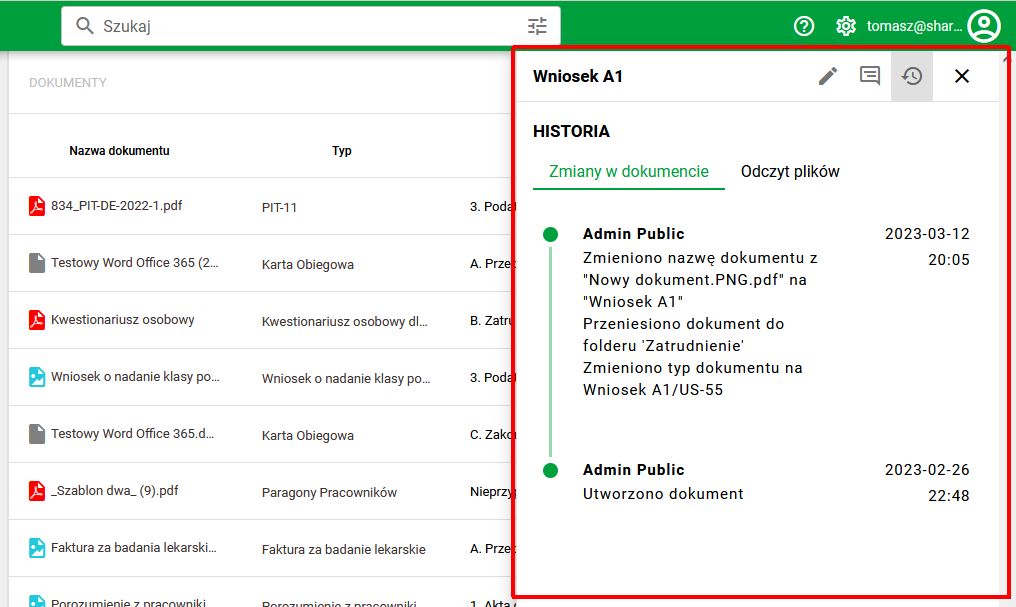
Operation history allows you to control changes made to the documentation. The system records what changes have been made to documents and who made the changes by which user.
Change audit is available in a separate tab on the document editing tab. The history preview is divided into document changes and file reading history. The data is arranged chronologically in the form of a timeline.
System security
HRobots' information security management system (ISMS) for IT and digitization services is certified to ISO/IEC 27001:2022. The standard sets requirements for:
- protecting personal and company data,
- processes that maintain information confidentiality, integrity and availability,
- technical and organizational measures for information security,
- identifying and monitoring information security risks.
See eFOB platform security for the certification scope and current certificate.
Electronic signature
The ability to place an electronic signature on a document ensures compliance with regulations.
The eFOB system enables signatures using the traditional KiR electronic signature.
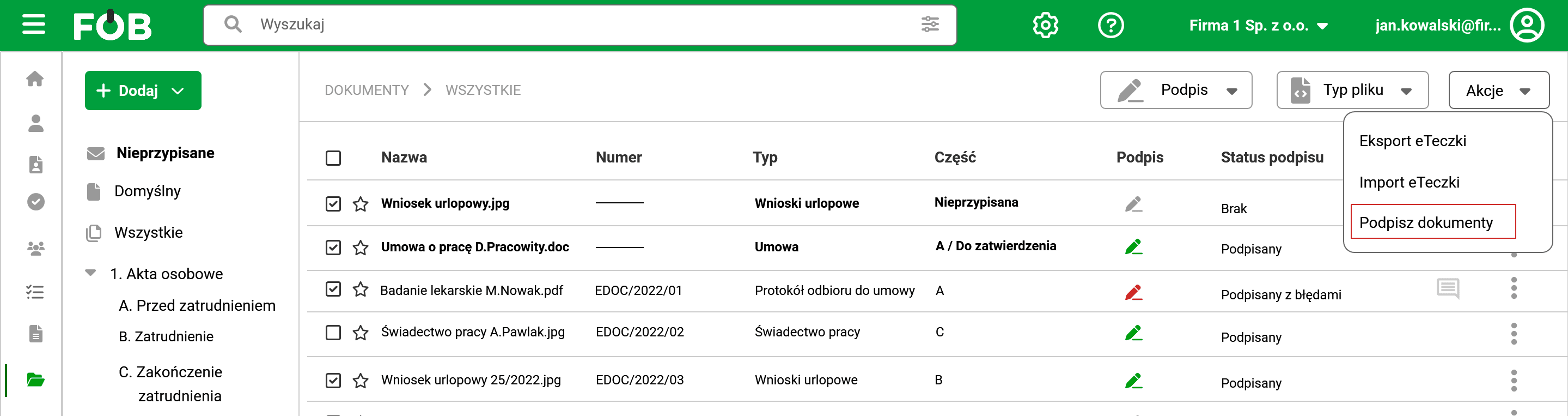
To sign a document/documents, select them on the list of documents and select the "Sign documents" option from the "Actions" field.
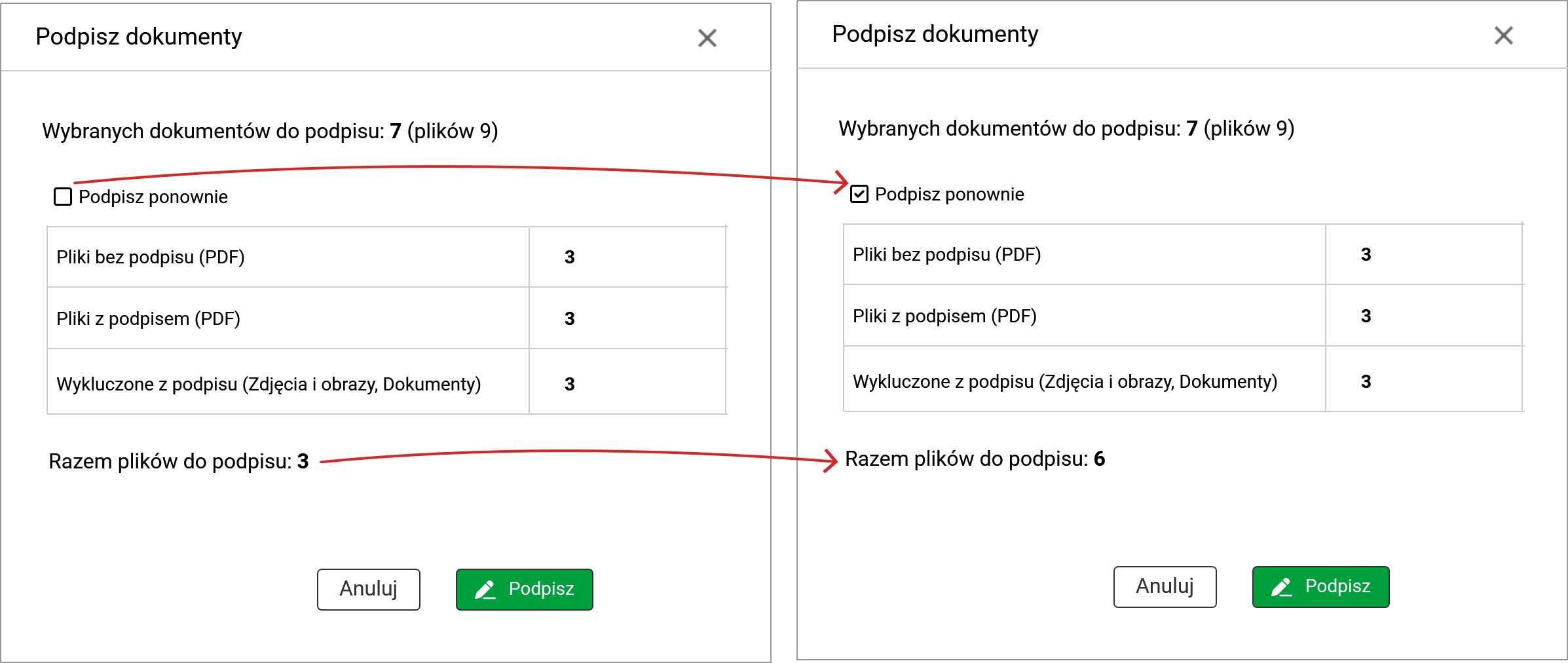
A summary will be displayed in a new window with information about which files have been selected for signing.
By default, the system will download previously unsigned PDF files for signing. To sign a document that has already been signed, select the "Sign again" option.
If the signature is not installed, a message will appear stating that the signature component is not installed with a link to install it.
Documentation export
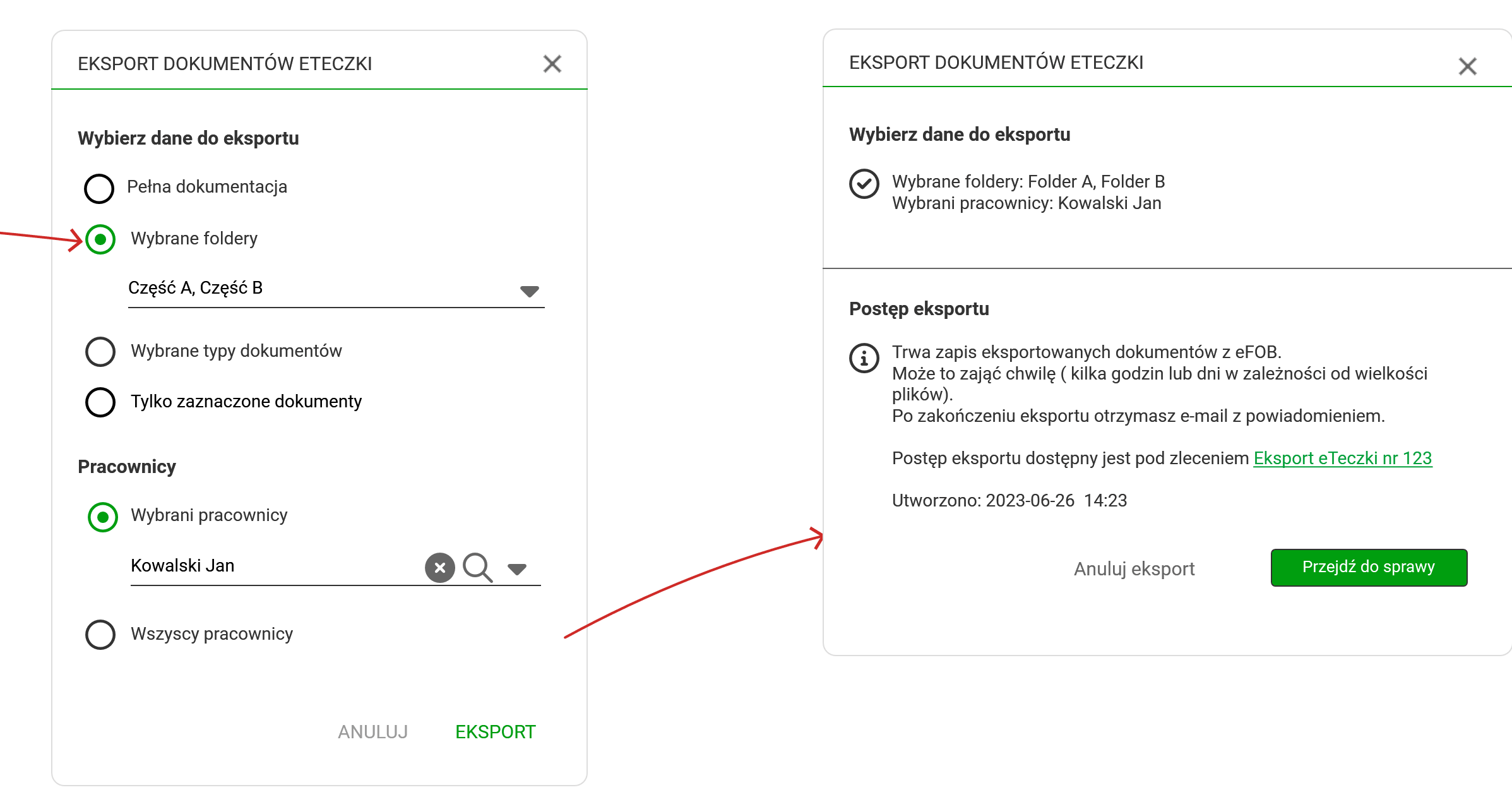
Documents added in the system can be downloaded in the Documents module -> “Actions” -> “Export documents”.
In the export settings window you can choose:
1) Data for export
– Full documentation – Selected folders – Selected document types – Only selected documents
2) Employees
– The chosen ones – Everyone
After starting the export, an order is created where the process progress is available. Once completed, a confirmation email is sent.
Exported documents (along with their metadata in XML format) are saved to separate folders for individual employees.