eFOB 3.0.0 - News September 2026
eFOB 3.0 – a new generation of the HR platform
On 24 February 2023 we released eFOB 2.0 – the first version of the Intelligent Employee e-File on a new cloud architecture. Since then, over almost 43 months (more than 3.5 years), we have shipped 59 further releases of the 2.x line and performed more than 100 production deployments, including hotfixes. Version 3.0 closes that chapter and opens a new one: eFOB has grown from an Intelligent Employee e-File into an HR-Tech platform that brings digital personnel files, the document generator, electronic signatures, a no-code process builder and a training module together in one system.
Onboarding, signatures and HR document workflows. Configure it yourself, without the IT department.
The three pillars of eFOB 3.0:
- No-code HR process builder – HR builds its own personnel processes: stages, forms, documents, signatures and notifications. Onboarding, offboarding, amendments, requests and certificates, with configuration import and export between environments.
- Training inside the process – a SCORM course (health and safety, GDPR, compliance) is simply a step in a case. The result, certificate and digital confirmation go to the employee's history and eFile.
- Less manual document work – OCR rules fill in metadata automatically, and the new document upload screen organises work with PDF files.
The full description, a sample onboarding flow, pricing and FAQ are available on the eFOB 3.0 page. Professional plan customers receive the new features automatically – with no extra fees and no migration. You can also try eFOB 3.0 free for 14 days.
What we built since eFOB 2.0 – three plans, three promises
Each of the 59 releases of the 2.x line strengthened one of the three plans we offer. Below are the key milestones.
Smart – organisation and compliance
- Change audit and historical file versions – every change in the eFOB has been tracked since the first release (2.0, February 2023).
- Full compliance with the Polish employee documentation regulation, support for Part E of personnel files, a GDPR retention mechanism and the ISO/IEC 27001 certificate (2.4, August 2023; now ISO/IEC 27001:2022, valid until August 2027).
- Flexible folder organisation and renumbering, plus document export and import even for very large archives (2.4, August 2023).
- multiple eFolders in eFOB for a single employee (2.7, February 2024).
- Reports module covering documents, employees and employment, plus missing-document control on positions (2.10, June 2024).
- Sign-in with Google and Microsoft accounts (2.13, August 2024) and Microsoft Entra (2.23, February 2025).
- Mandatory two-factor authentication (2FA / TOTP) for administrators (2.39, November 2025).
- Global library of more than 300 document types and Word / HTML templates, plus permission configuration import (2.50, April 2026).
- Effective permissions panel – analysis of a user's actual access to functions and data (2.55, June 2026).
- Ukrainian (2.20, January 2025) and Romanian (2.52–2.54, 2026) language support.
Business – efficient day-to-day work
- Candidates and Boarding – from recruitment to hiring in one place (2.2–2.4.3, 2023).
- Bulk employee import from Excel, drag-and-drop file uploads, bulk metadata changes (2.5.2–2.6.1, November–December 2023).
- Mobile document scanner – many scans at once, straight from your phone (2.5.1, October 2023).
- Custom filters and views in the Documents module (2.7, February 2024) and bulk renaming (2.8, March 2024).
- Employee import with flexible field mapping and case export to the HR system, plus in-app help (2.9, April 2024).
- Document type import and export from Excel – faster eFOB rollout (2.11, June 2024).
- HTML templates in the document generator (2.45, February 2026) alongside Word templates.
- Mobile case view (2.51, May 2026) and a redesigned Add document screen with PDF merging (2.52, May 2026).
- Employee and case widgets with sorting and filtering on the dashboard (2.54–2.58, June–August 2026).
Professional – automation and paperless
- Qualified signature of many documents at once (2.4, August 2023) and an individual digital signature in case workflows (2.10, June 2024).
- AI-based OCR – document type recognition without codes (2.5.0, October 2023), text extraction from a selected area (2.6.0, December 2023), the Accurate OCR mode running locally in the browser (2.53, May 2026).
- QR codes on documents – automatic splitting, type recognition and naming of bulk scans (2.6.2, January 2024) and recognition of external QR codes (2.44, February 2026).
- Cases – flexible no-code workflows with documents generated from form fields, notifications and dashboards (2.8, March 2024).
- eFOBsync – synchronisation with HR and payroll systems: Symfonia R2Płatnik (2.14, September 2024), Symfonia KiP (2.23, 2025), Enova (2.26, 2025), Optima (2.27, 2025), TETA (2.42, January 2026).
- Signius advanced signatures (2.30–2.31, July 2025) with a signature audit (2.42, January 2026).
- Bulk QES and facsimile signing across many cases with signature placement configuration (2.46, March 2026).
- Process library, case type import and export, and OCR rules that fill in metadata automatically (2.52, May 2026).
- SCORM training in eFOB Cases with a certificate stored in the case (2.52, May 2026).
- State automations – automatic facsimile signing, filing documents and moving to the next state (2.57, July 2026).
Business plan extended with ready-made cases and document templates
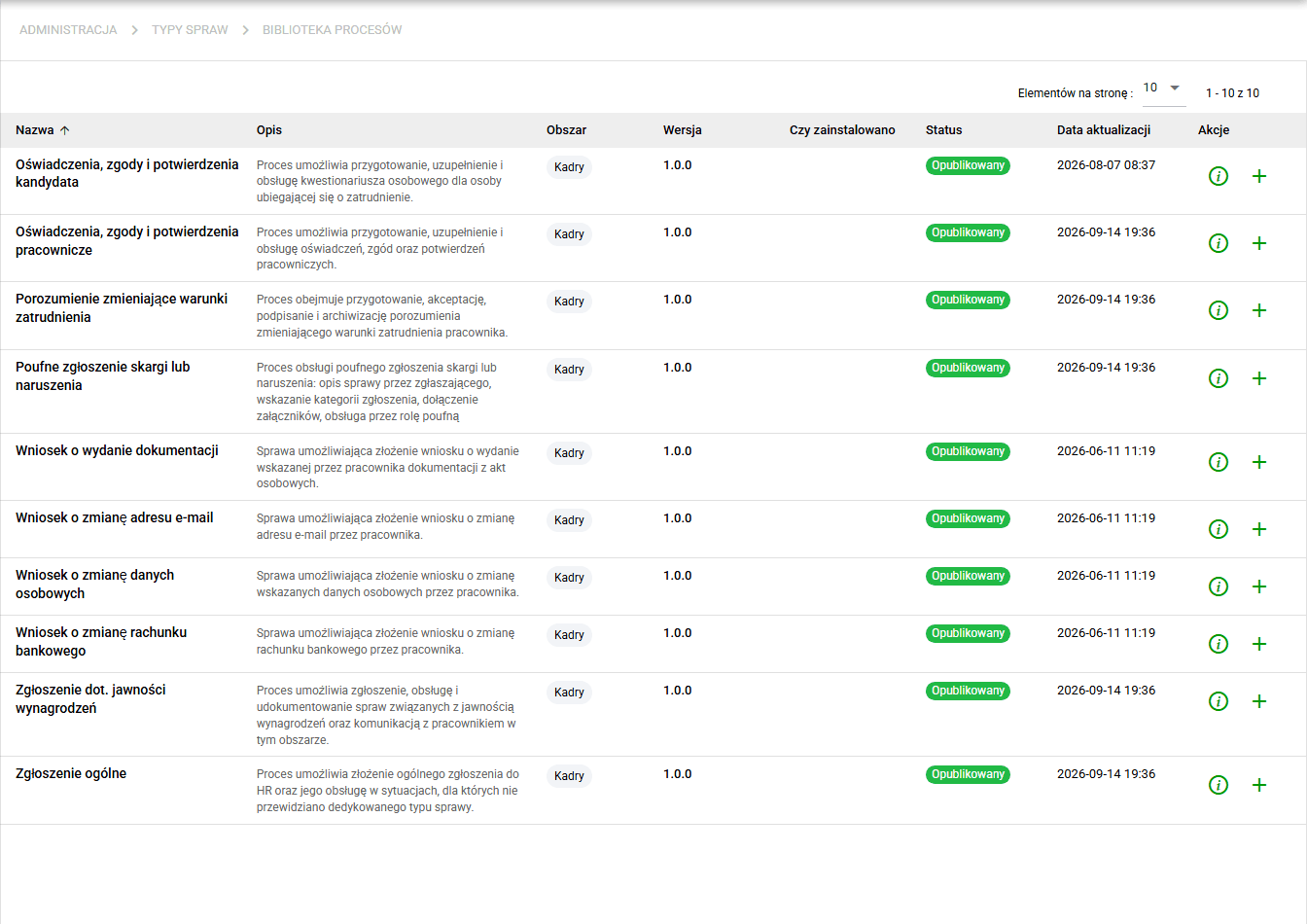
With eFOB 3.0 we are extending the Business plan. Organisations on this plan can immediately use standard cases from the Process Library – without building workflows from scratch:
- Request to Change Email Address,
- Request to Change Personal Data,
- Request to Change Bank Account,
- Request for Documentation Release from personnel files,
- Candidate Statements, Consents and Confirmations (personal questionnaire),
- Employee Statements, Consents and Confirmations,
- Agreement Changing Employment Terms,
- Confidential Complaint or Violation Report,
- Pay Transparency Request or Report,
- General Report to HR.
Each process is installed with a single click from the From library option in Administration / Cases, offers a configuration preview before installation and runs in read-only mode until the administrator decides to customise it. See Process library and transfer of case configurations for details.
The Business plan also gains more than 60 standardised business document templates for the generator – ready-to-use templates for requests, statements, agreements, certificates and confirmations that you select in the document generator and fill with employee or case data.
Case transitions – clearer actions for users
Case state-change buttons are now clearer and more flexible. Administrators can decide how a transition looks and when it is available, and users immediately see what they can do in a case.
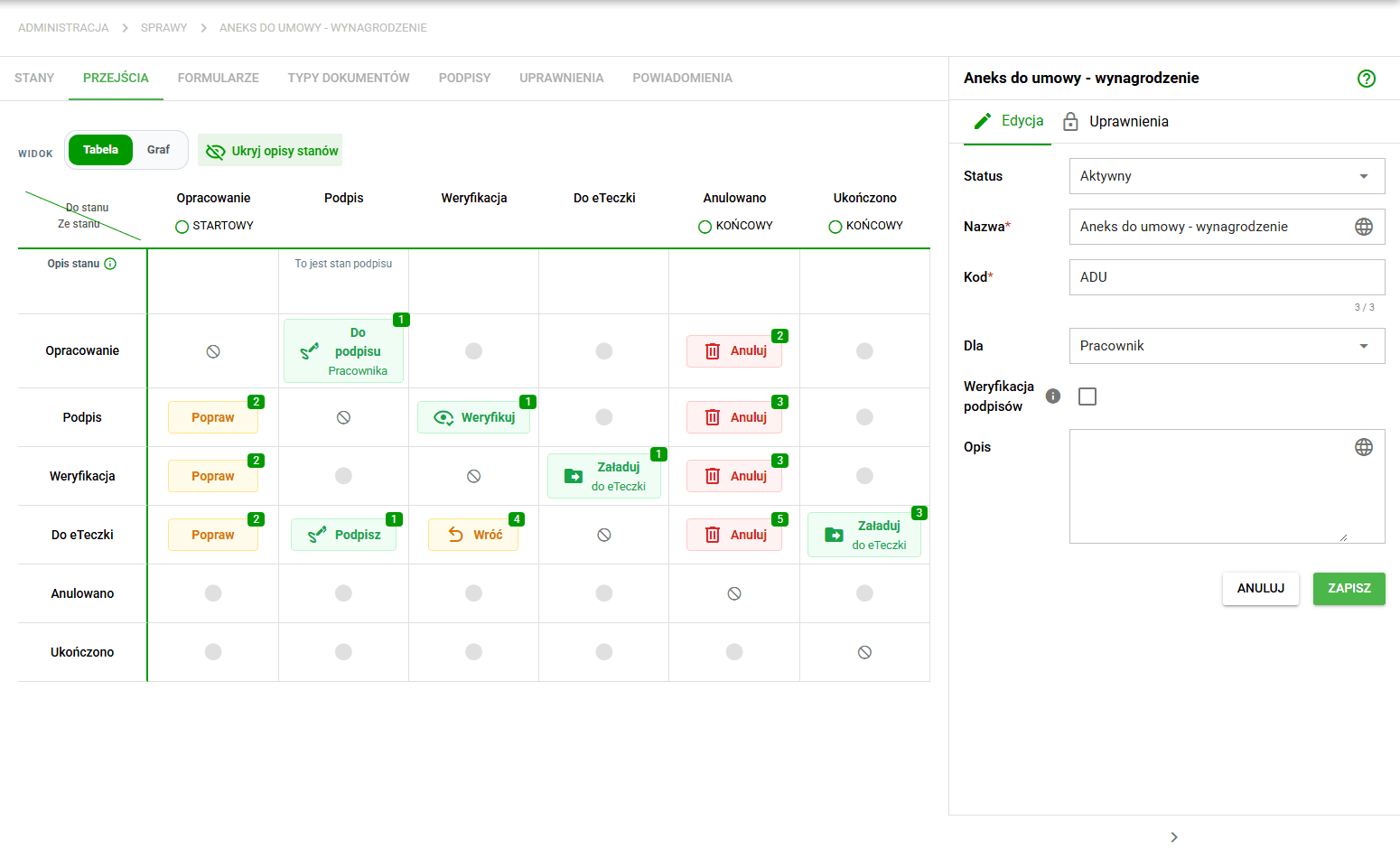
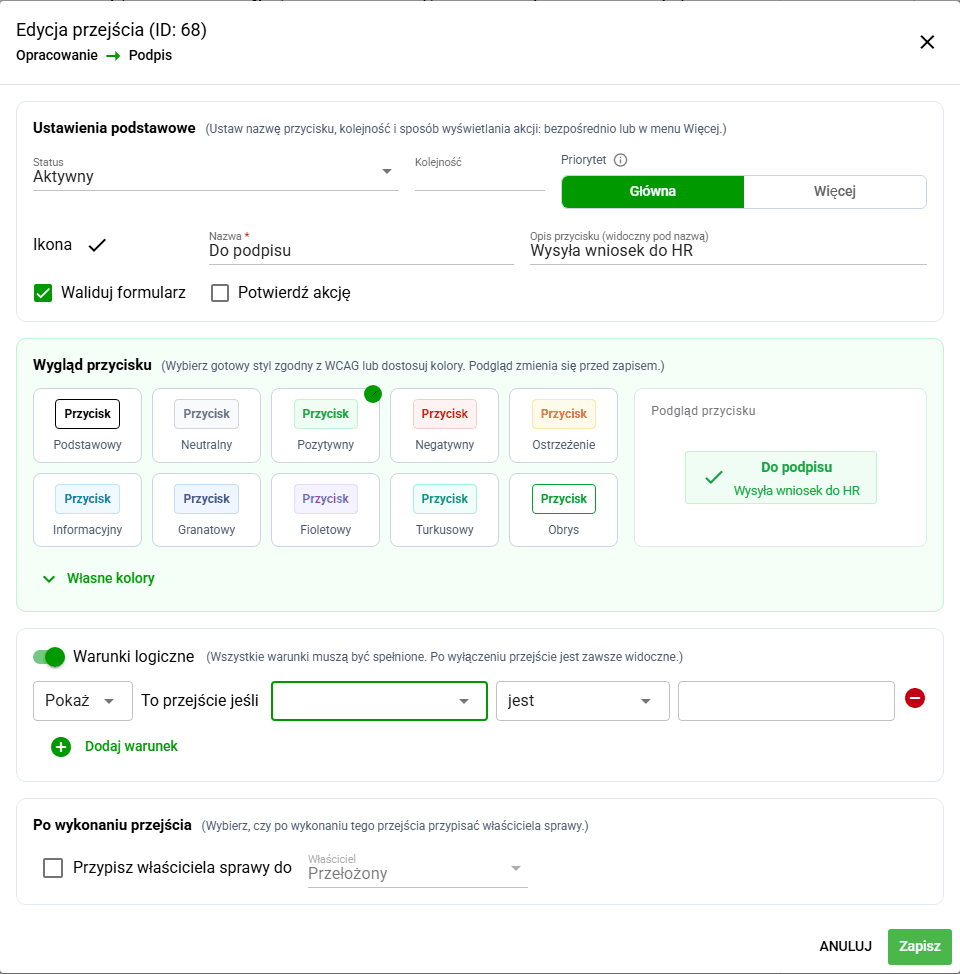
The case type transition configuration (Administration / Cases / Transitions tab) now offers:
- Button icon – selected from an icon library with search and preview.
- Ready-made colour styles (including primary, neutral, positive, negative, warning, info and outline) or custom background, text and border colours. The system also automatically picks contrasting colours for consecutive transitions.
- Order and priority – main actions are visible immediately, the rest go to the More menu.
- Description under the button name that hints at the effect of the action.
- Logical display conditions – a button can be shown or hidden depending on form field values (e.g. equals, contains, is empty, starts with). All conditions must be met.
- Case owner assignment after the transition, for example the supervisor, so the case automatically reaches the right person.
- Show / hide state descriptions in the transitions table, which makes the configuration easier to review.
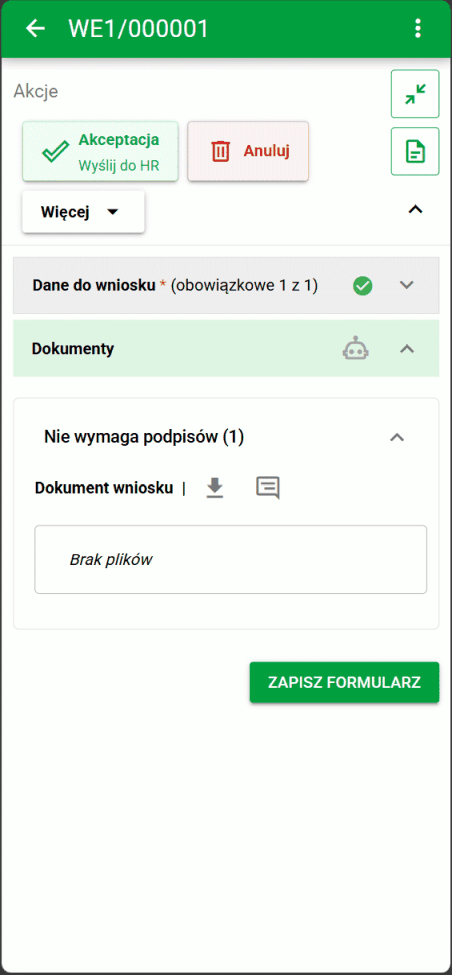
In Cases and My cases, transition buttons appear in the configured order, with icons and colours, on both desktop and mobile. When an action cannot be performed – because required fields are missing, the form contains errors or a document is awaiting signature – the button is disabled and a tooltip explains why. The same rules apply to bulk state changes across many cases. Transition configuration is preserved during case type export and import and when installing from the Process Library.
Documents that match current form data
Changing case form data can affect the content of a prepared document. In eFOB 3.0, administrators can specify fields affecting document content and decide how the system responds when those fields change. This helps keep documents consistent with case data and reduces the risk of using an outdated version.
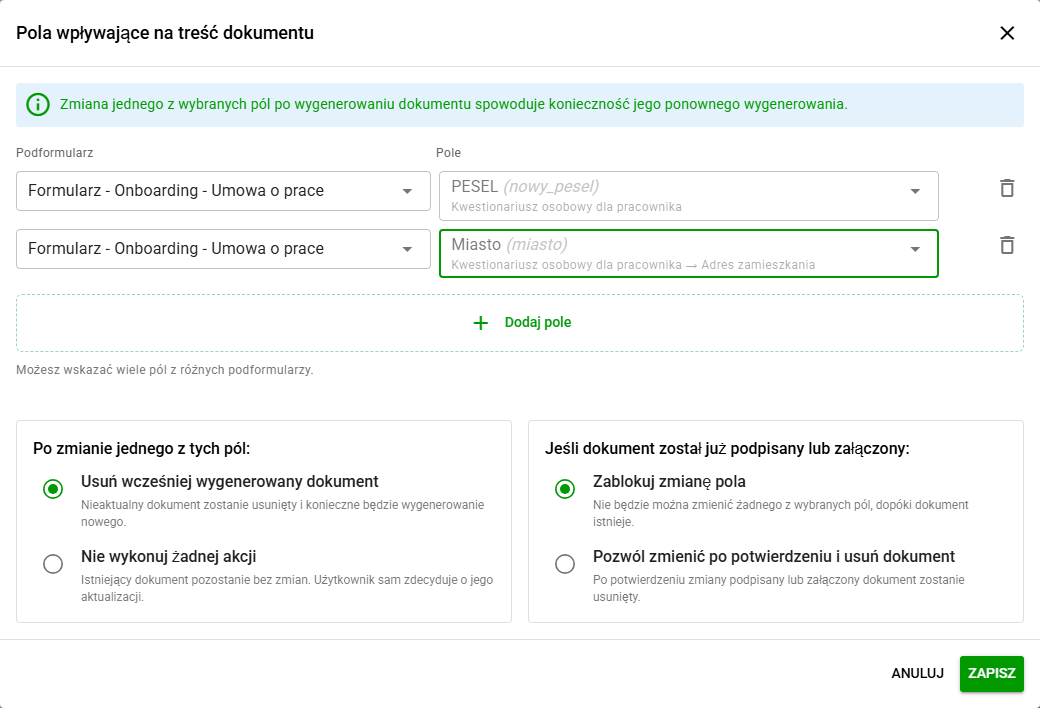
In the case document type configuration, administrators can select multiple fields, including fields from different subforms. They decide whether a change removes the previously generated document or leaves it unchanged. For an attached or signed document, they can block changes to the linked field or allow them after confirmation and removal of the document.
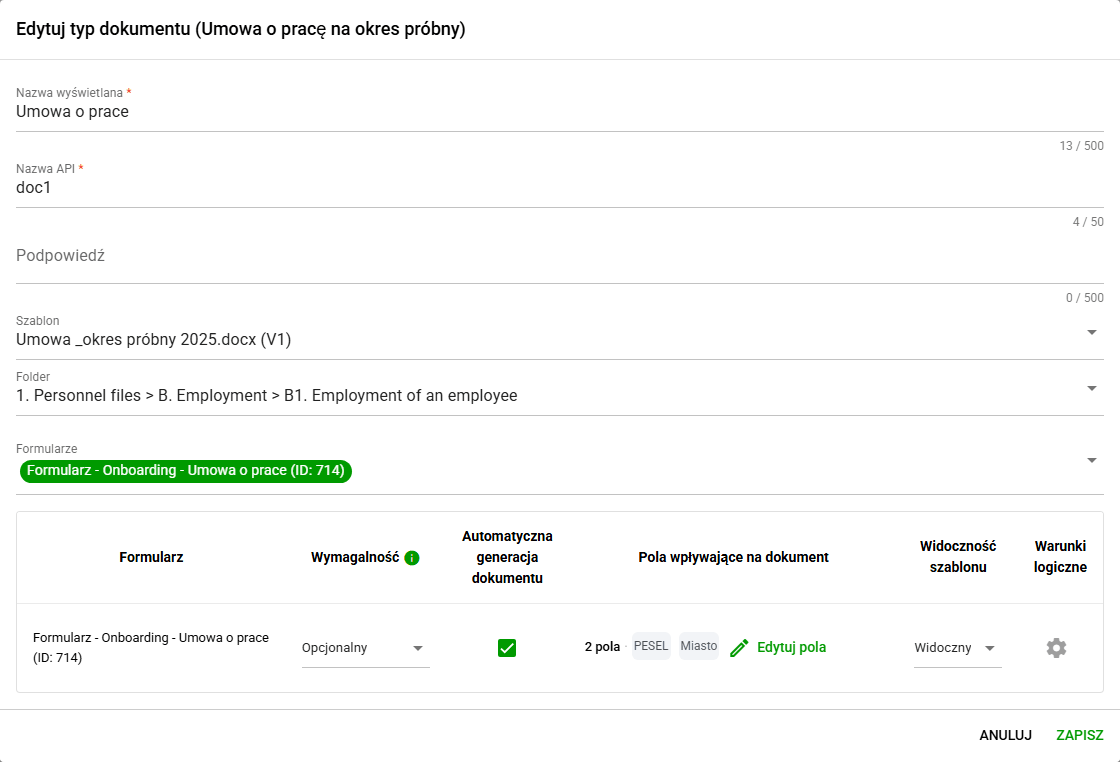
Users can see which documents a change affects and when confirmation is required. If automatic generation is enabled for the document, saving the changed data and removing the outdated version triggers regeneration. The feature works in Cases and My cases according to the process configuration.
Facsimile signatures in candidate cases
A candidate using an access link to their case can sign a document with a facsimile signature (SES) without creating a standard employee account. This makes candidate documents easier to handle in processes configured for this signature type.
Signing is limited to the case shared with that candidate and to documents and phases configured for facsimile signatures. A facsimile signature does not replace a qualified signature where a process requires one. See Case signatures for signature type configuration.
Fixes and minor improvements 🛠
- Performance: We have improved retrieval of document, employee, candidate and case lists, along with signature data and document generation statuses. We have reduced repeated queries when displaying this data.
- Electronic signatures / Signius: We have added the ability to interrupt an unfinished document sending and retry a cancelled or failed operation. The system displays a warning when sending takes too long.
- Documents / Automatic metadata completion rules: We have improved employee recognition when the extracted data includes a middle name. The system assigns an employee only when the match is unambiguous and checks the length of extracted identifiers.
- Documents / File uploads: We have fixed automatic OCR startup when ungrouping previously merged PDF files and improved date validation during document uploads.
- Documents / Names and sorting: We have added the document number as an element of a manual rename pattern for documents already stored in the system. We have also added document list sorting by Created by and Modified by.
- Documents / Export: We have fixed XML export of documents from the default eFolder and included the eFolder name in metadata exports to Excel.
- Employees / Excel import: We have corrected date and apartment number labels and the fields available in the import template, so it no longer suggests fields that cannot be changed through import.
- Cases / Document generation: We have fixed document generation in cases with different types of form fields. Dictionary values, including multiple selections, now appear as readable names instead of raw technical data.
- Cases / Forms and files: We have hidden inactive forms from the case-state form selector, improved document generation status display and fixed drag-and-drop file uploads. The case name field now shows a character counter (limit 50). We have fixed submission of form data, document dates and attachment changes when moving to the next stage. In candidate cases, generated documents now appear without reloading the page.
- Search / Dates: We have enabled direct date entry in global search filters, with date and range validation.