eFOB 2.44.0 – News February 2026
On February 11, 2026, the eFOB platform was updated to version 2.44.0. introduces a set of improvements that further improve work with documents and automatic recognition.
The most important changes include:
- New options for Notes and Main Folder available directly in the Documents module - greater convenience of work and faster access to key information.
- Support for external QR codes, enabling automatic recognition of documents from additional sources (e.g. your ERP system) and more efficient file organization.
The eFOB 2.44.0 update is another step towards full automation and comfort of document management in your organization.
Documents: Notes
From now on, each document in eFOB can be enriched with a Note, which allows you to add comments, business context and all additional information needed in everyday work. It's a quick way to capture knowledge that usually gets lost in emails or conversations.
What do you get with Notes?
- Adding, editing and deleting notes directly on the document.
- Lots of space for content - one note can have up to 4,000 characters.
- Full transparency of changes - each edition is registered: who, when and what content was introduced.
Note preview
You can quickly preview the note:
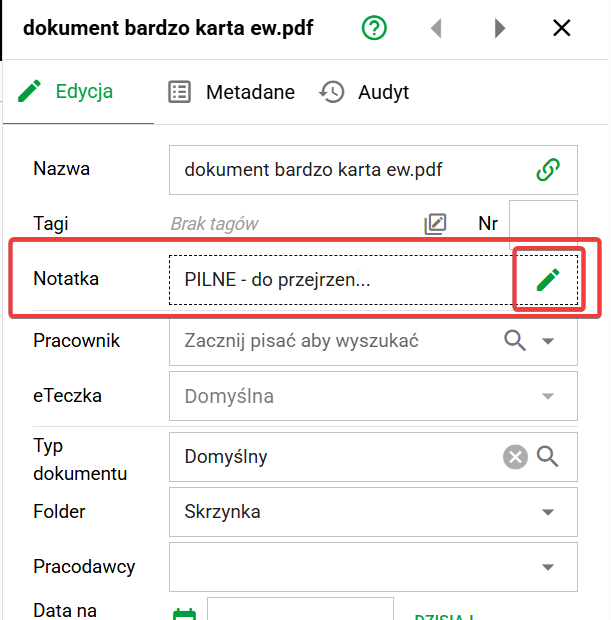
- in the document details - in the Edit tab,
- in the list of documents view - after adding the Note column.
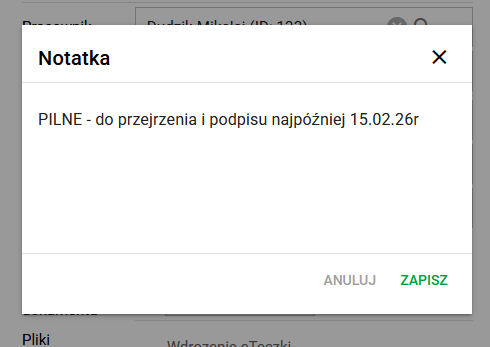
By default, the first 20 characters are visible. Full content is available in the document details by clicking the green pencil or in the list view by hovering over the green bubble.
Notes audit
Each note change is saved in a new tab Audit → Note changes, along with the information:
- who made the change,
- when,
- what was the content (with preview).
This makes notes not only convenient, but also fully compliant, controlled and transparent - ideal for environments that require reliable documentation of activities.
Documents: Main eFolder
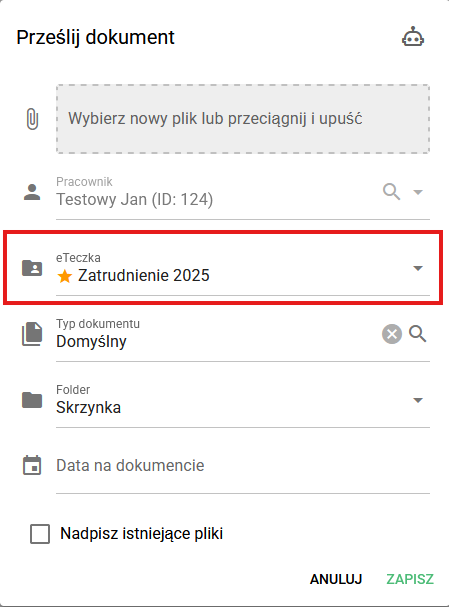
For organizations where employees have more than one job, we have introduced the main eFolder setting. This is an improvement that automates and simplifies everyday work with documentation, eliminating manual selections and the risk of errors.
How does the main eFolder work?
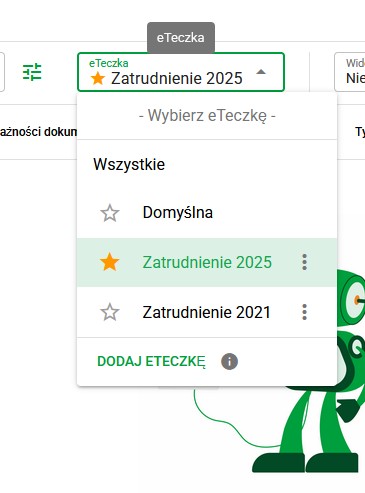
- Marking one eFolder as main - just one click (star icon ⭐) to indicate which collection should be the default one.
- Intelligent suggestions when adding a document - the system automatically selects the main eFolder (also in the QR code recognition option), which significantly speeds up work.
Automation that relieves employees' workload
The functionality works fully automatically:
- Integration with HR systems can independently create and mark the main eFolder - without the need for user intervention.
- Adding documents is faster and more precise - if no other eFolder is indicated via the QR code, the document goes to the main collection by default.
Full synergy with QR codesThe new functionality works great with the QR code recognition mechanism:
- If the QR code points to an existing eFolder - the document goes exactly there.
- If the QR code refers to a non-existent eFolder, the system will suggest quickly creating it.
New: Recognition of external QR codes - even greater automation of documents and matters
In version eFOB 2.44.0, we have extended support for full QR codes generated in external systems (e.g. ERP). Thanks to this, documents can be processed faster, more precisely and practically without user intervention.
What does this mean in practice?
A document with a QR code can be automatically assigned to the appropriate system elements, such as:
- 🏢 company (tenant)
- 👔 employer
- 📄 document type
- 👤 specific employee
- 📁 appropriate eFOB
And all this without manual selection of data by the user. This is another step towards fully automatic and error-free document flow.
For more information, see: QR and 3D code support
Issues: Configurability improvements and fixes
In the latest version, we have introduced a number of improvements that increase the predictability of operation, configuration flexibility and reliability of processes in the Affairs module. Thanks to these changes, working with case flow becomes simpler, more transparent and better suited to the needs of the organization.
The most important changes and improvements
- Administration → Transitions/Button: we have added a new, optional option "Assign case owner", allowing for more precise control of responsibility at individual stages of the process.
- Administration → States: We have introduced the requirement for the next "Document loading state" and the blocking of editing the "Source/target data" fields to ensure greater consistency and stability of the configuration.
- Administration → Document Types: We have improved the operation of the "Validate form" and "Confirm action" options when creating cases, which minimizes user errors and increases work comfort.
- Editing Cases: Owner and Responsible Persons - are now presented more transparently - assigned persons are visible, while blocked roles are hidden when changed.
- Editing Cases: We have improved the mechanisms for changing the Owner and generating documents, which improves the reliability and smoothness of work in complex processes.
Test for free for 14 days!
Sign up for a trial