Adding/importing documents to eFOB
Can I add multiple documents to eFOB at once, or do I have to add each document individually?
You can import several documents at once into eFOB, which significantly speeds up the document transfer process. Here are some ways you can do this:
-
Mass adding files: The eFOB system allows you to drag and drop many files at the same time, directly to the appropriate folder in eFOB. This way you can quickly add multiple documents at once. More information in the article: Upload files
-
Import of employee documents in eFOB: The system allows you to add documents via a ZIP file and an XML file with metadata. More information in the article: Export/Import of employee documents in eFOB
-
ZIP with an Excel worksheet: If files should be assigned using a prepared list, include a worksheet with employee identifiers and filenames. After upload, select the worksheet and map its columns. The image below is an example, not the only permitted column layout:
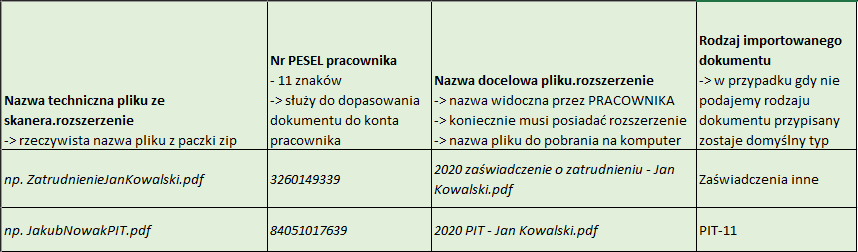
For a worksheet-based import:
- Select the employee identifier type, such as ID, external ID, PESEL, or identity-document number.
- Select the correct Excel worksheet and skip headers if its first row contains column names.
- Map the columns, especially the employee identifier and filename. Check that names match the files in the archive.
- Review validation results, warnings, and errors before creating the import.
If the ZIP contains no Excel file, the application passes the extracted files to Upload files, where you can check and complete their data. When the archive contains several Excel files, the system looks for import.xlsx. Prepare an unambiguous control file and check the selected worksheet.
Use Automatic naming to choose a filename pattern for the files you add:
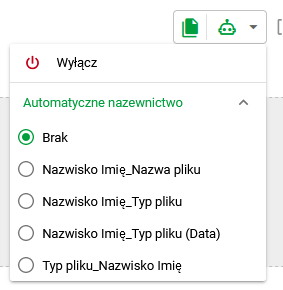
Choosing an automatic naming pattern
Automatic metadata and naming depend on available features, permissions, and configuration. For setup instructions, see automatic metadata rules and naming rules.
When importing/adding documents, will eFOB distinguish the document type itself, or do I have to mark it myself?
Recognition can use QR/3D codes or configured rules. Check the recognized type, employee, and date before saving; a ZIP file alone does not guarantee correct document assignment.
The codes look like this:

Example QR code
For more information, see “Automatic Processing” in article
Can I add documents using the mobile app? If so, can several documents be added at once or only one at a time?
The mobile application supports adding documents. The addition takes place in the DOCUMENTS module. To start adding a document, use the button:

Add button
Located in the lower right corner of the screen.
The mobile scanner can collect successive page photos and prepare a PDF. Check page order and readability before saving. A multi-page PDF is not automatically split into separate documents.
More in the article: Mobile PDF scanner
Can I add several documents at once to the same folder without selecting a document type?
Yes. You can add several documents at once to the same folder. We can automatically assign a folder to added documents by adding documents from the view of the folder we are interested in:

Sample Folder Selection
Such additions can be saved without specifying the employee/document type. These parameters can be changed at further stages.