Affairs – introduction
What are case types?
Case types define different types of business processes HR / HR / payroll / other as part of cases run in the system, e.g.
- Onboarding/employment
- Annexes to contracts
- Statements of the employee/collaborator
- Confidentiality agreements etc.
The configuration of case types is described in the administration part: Case types.
Benefits of case type management
- Structure and order: Case types allow for a clear organization of various operational processes.
- Personalization and security of circulation: In each case, you can assign the right documents, their templates, and determine who has what permissions - which guarantees that the procedure is in accordance with the company's policy.
- Effective automation of HR processes: Individual forms, approval paths, document types, signatures, notifications and conditions can be defined for various types of cases - which increases work efficiency.
Integrations that further increase the value of case types
Integration with digital signatures
The eFOB system supports various types of signatures, which allows:
- Direct signing of documents in the case - without the need for export, printing and scanning.
- Support for various signature methods - you can use the built-in KIR signature, facsimile or external signature, e.g. Signius.eu.
- Increased credibility and legal compliance - because qualified electronic signatures have full legal force.
Document generator (Word, mail merge)
The document generator in eFOB allows you to:
- Create documents based on Word templates that use case fields (e.g. employee name, position, dates, etc.).
- Generate documents in bulk thanks to the mail merge function - which significantly saves time.
- Templates are easy to use, and the system inserts data from the case itself, creating personalized documents ready for sending or signing
Documents dependent on case fields
Case types can include documents whose content depends on selected form fields. If a user later changes one of these fields, the system checks whether a related document has already been generated based on the earlier data.
The configuration of fields affecting document content is described in the Case document types article.
In practice, there are three main scenarios.
Warning about removing a generated document
If the document was only generated earlier and does not yet have any attached files, the system shows a warning when the user tries to save changes or execute the next workflow action. The message explains that continuing will remove the generated file and that the document will need to be generated again based on the updated data.
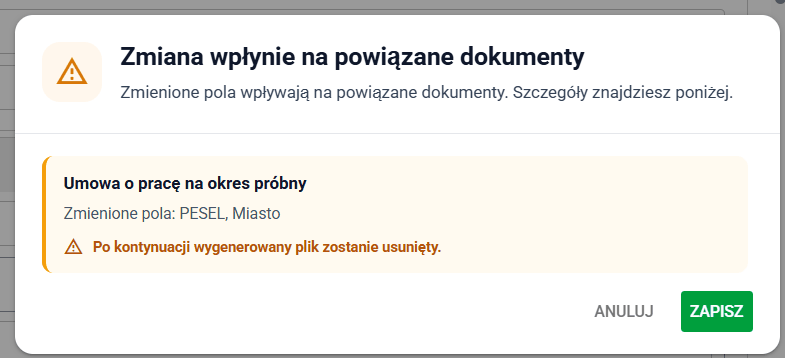
Warning about removing a previously generated document
Warning about removing the generated document and attached files
If the document is configured with the Allow change after confirmation and remove document option and there is already a signed file or additional attached files related to it, the system shows a warning before saving the changes. The message explains that continuing will remove the generated document together with the files related to that stage.
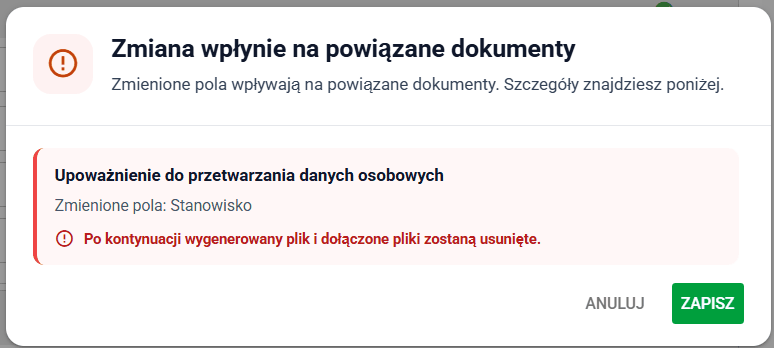
Warning about removing a document related to case fields
Blocked field editing
If the document is configured with the Block field change option and the related document already has attached files, the field becomes blocked directly in the form. Next to that field, the user sees a message explaining that it can no longer be changed because it affects documents with attached files.

Blocked editing of a field linked to a document
Example case types and workflows
Examples of case usage together with a description of the main configuration elements are available in a separate article: Example case types and workflows.