Complex matters
Zaktualizowano 2026-08-06
Case Filtering
After clicking on the extended search option, a list of filters will appear, according to which you will be able to search for cases that meet the selected conditions.
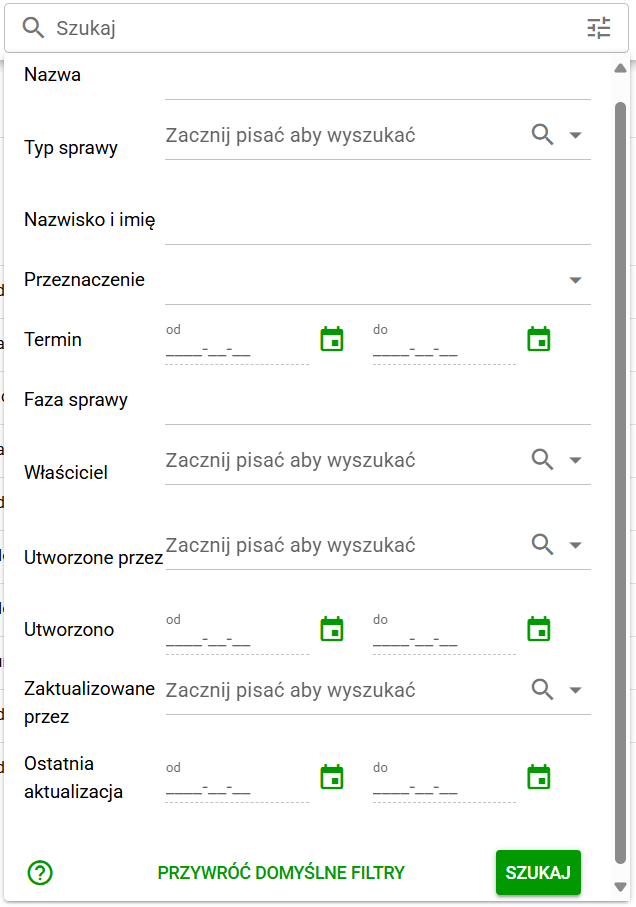
Affairs. Filtering
Available filters:
- Name – Search by the full document name or part of the name.
- Case type (drop-down list, single selection):
- Completing documents
- Application for documentation
- Request to change your e-mail address
- Request to change personal data
- Application to change the bank account
- Surname and first name (employee).
- Purpose (drop-down list, single selection) – indicates who the cases of a given type concern:
- Candidate
- Optional candidate
- Worker
- Optional worker
- Without candidate or worker
- Dates From and To – Specifying the date range.
- Case Phase – Case processing stage.
- Owner (User) – Drop-down list, single selection.
- Created by (User) – Drop-down list, single selection.
- Created (Date) – The date the case was created.
- Updated by (User) – Dropdown list, single selection.
- Last Updated (Date) – Date the case was last updated.
After entering the required filters, click the SEARCH button.
At the bottom of the extended search view there is a button RESTORE DEFAULT FILTERS, when clicked, all filters will be cleared.