Permissions – introduction
The concept of permissions
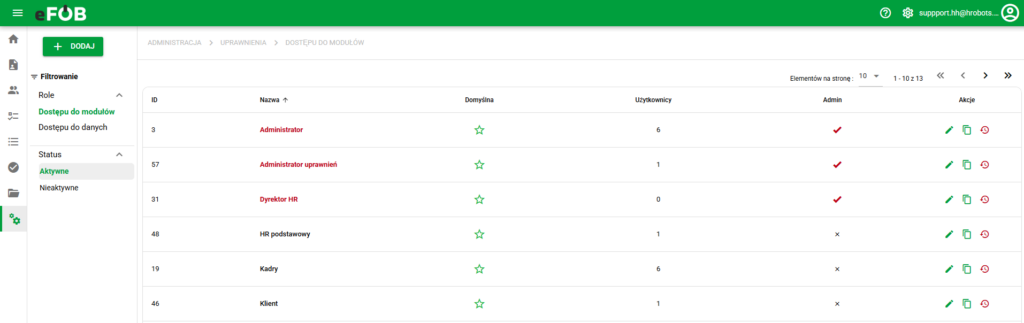
Permissions Screen
The permissions shown above are the window used by administrators to manage roles. There are module and data access roles:
1. access roles to modules (MDL) are used to control general access to modules, i.e.:
- visibility and permissions of key modules and system functionalities
2. access to data (DS) roles are used to control access to specific records, i.e.:
- visibility and permissions of data records depending on the settings: my data/my employees/all
The created roles are used when creating/editing specific users in the administration panel in the window -> USERS.
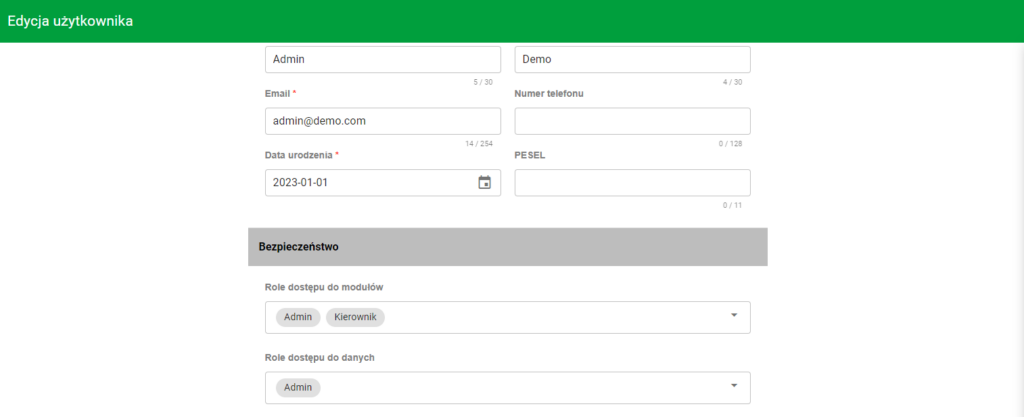
User Edit
One or more roles of each type may be assigned to a user and they have a joint nature (authorities are added up).
To sum up, roles allow for flexible control of access to modules, functionalities and data for a given user.
Administrators can check how assigned roles work together by using the Effective permissions panel in user administration. The panel shows actual access resulting from the combination of MDL roles, DS roles and additional security rules.
More information about user management can be found here: Users
Permission for effective access analysis
Access to the Effective permissions panel is controlled by a separate permission in the user administration area. It should be granted only to administrators who are expected to analyze the actual access of other users.
After the permission is granted, the administrator can:
- run the analysis from the user menu or user edit form,
- view a summary of module and record access,
- check the sources of specific actions, such as an MDL role or DS role,
- review warnings about broad or unusual access scopes.
Running the analysis and fetching records may be recorded in system logs/audit, so this permission should be treated as administrative and granted according to the least-access principle.
Module functionalities
⚠️Note: Self-Create/Edit options are ONLY available for eFOB Enterprise packages.
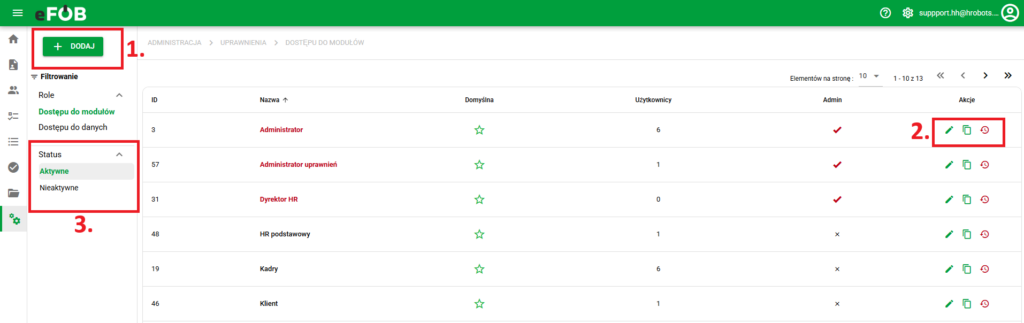
Functionalities of the permissions management screen
1. Adding – adding a new role
2. Actions allow you to edit, duplicate or deactivate roles.
a) Editing a record – allows you to adjust the permissions of a given role, as well as its name. It is done using drop-down lists in which we select and deselect the records we are interested in. To accept the changes, finally use the green SAVE button at the very bottom of the screen.
b) Duplicate – creation/duplication of a new role based on the selected record
c) Deactivate – hide the record. The record can be redisplayed using the filter from point 3, and then be edited, duplicated, or activated
3. Status filter – display active or inactive roles
Roles suggested for new users
If new accounts usually need the same basic access, mark the appropriate roles as defaults. Use the star icon beside the role in the list. This setting requires permission to edit roles.
When adding a new user, the system preselects MDL and DS roles marked as defaults. Check both kinds before saving the account and remove access the person does not need. Do not make a broad administrator role the default merely to simplify setup.
This changes a setting used when creating accounts. To change existing users' access, check their assignments and Effective permissions instead of assuming that changing the star will rebuild assignments under the new policy.
Transfer a reviewed role configuration
Import and export let you reuse a prepared access configuration in another role or company without rebuilding each setting manually. Transfer module-access roles (MDL) and data-access roles (DS) separately. Use files from a trusted source.
- Open a role configuration of the appropriate type. Save changes before exporting; export requires a saved role and does not include unsaved edits.
- Select Export to keep the configuration file. Before updating an existing role, export its current configuration as a backup.
- In the destination, start creating a new role or open the role you want to change. The screen determines whether import creates a role or updates an existing one.
- Select Import and choose a JSON file of the matching type. An MDL file does not replace DS configuration, or vice versa.
- Read the validation result. If the system reports incompatible or unavailable items, correct the configuration instead of bypassing the message.
- Check the role name and type in the confirmation dialog, then confirm the import.
Confirming import saves the configuration in the system. It is not merely a preview waiting for a later Save click. Updating a role can affect access for users assigned to it.
After importing, check module access, data scope, user assignments, and whether the role is a default role. Before wider use, inspect a representative account in Effective permissions. Do not assume a configuration transferred from another company gives identical access to its data.