Reporting
The reporting module in eFOB enables the analysis of HR data, lists of documents and system events in the form of ready-made reports with the option of filtering and exporting data.
Data from reports can be used in BI, Excel tools or integrated with external systems in analytical and control processes.
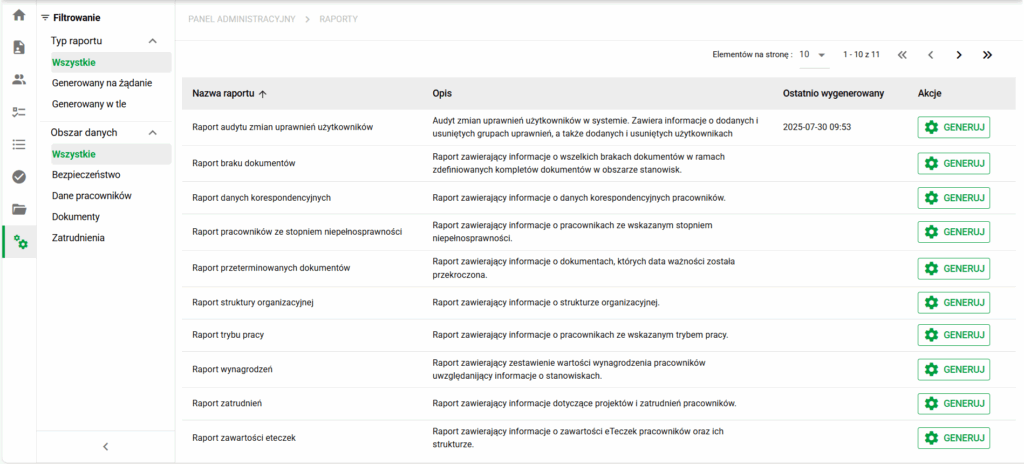
How do reports work in eFOB?
Generation types
| Report type | Characteristics | Export |
|---|---|---|
| ⚙️Generated on demand | Created at runtime | XLSX |
| 🕒Generated in the background | Automatically 1× per day | XLSX (Download/Regenerate) |
Filtering reports (list)
Reports can be searched and filtered by:
-
generation type (on demand / background)
-
data area (security / employee data / documents / employment)
-
report name (top search field)
Report performance
With a large number of employees and documents, it is recommended to use filters (date, position) to limit the number of records and speed up report generation.
Report on selected employees
If a report offers an Employee filter, select one or more people in its parameters. For example, the Missing documents report lets you check a selected employee group instead of basing the review on the whole organization.
Before generating it, check the other parameters, including active status, position, and document type where available. After downloading the spreadsheet, verify that the result covers the expected people. Selecting rows in another module does not set the report parameters.
How to read reports – important information
Each report in eFOB:
- has a defined set of columns
- is exported to Excel (XLSX)
- allows filtering data inside the report
- Active employees (Yes/No) – default: "Yes"
- Date range – filters records by date values in a given column
- contains data current at the moment of generation (in ⚙️On Demand mode)
- usually has "External ID 1/2" columns (Employee), which can be used for integration with external systems
👉 Detailed specification of the columns can be found in the description of each report.
🔴Note: Reports may contain personal and sensitive data. Reports present complete data within a given area, regardless of views limited in other application modules. Access to reports depends on the user's authorizations at the administrative level.
Store and share downloaded reports according to your organization's rules. A report spreadsheet is not a copy of the document files stored in an eFolder.
Most frequently used reports
- Employee data: Correspondence data report (ongoing verification of employee contact details and preparation of address and communication lists).
- Documents: Missing documents report (ongoing control of document completeness and preparation for audits).
- Documents: Report of expired documents (monitoring documents requiring renewal and reducing the risk of formal non-compliance).
- Security: Audit report on changes in authorizations (control of changes in access to data and system modules for the purposes of audit, security and compliance with ISO 27001).
Area: Security
Audit report of user permission changes
- Purpose: Audit of changes in access to data and system modules (ISO 27001, internal control, IT audit).
- Description: A report containing information about all changes to data access groups and modules for each user, including users deleted and added during a given time period.
- Generation Type: ⚙️On demand.
- Filters:
- Change date (From)
- Change date (To)
- Report columns:
- changed_at
- changed_by
- changed_user
- action
- group_name
Area: Employee data
Correspondence data report
- Purpose: Enables quick access and verification of current address and contact details of employees.
- Generation Type: ⚙️On demand.
- Filters:
- Position
- Start of employment (From)
- Start of employment (Until)
- End of employment (From)
- End of employment (Until)
- City
- Active employees (Yes/No) – default: Yes
- Report columns:
- Position
- Employee ID
- External ID 1
- External ID 2
- Name
- Name
- PESEL number
- Country
- Postal code
- City
- Street
- House number
- Property number
- Private telephone number
- Business telephone number
- Personal email address
Report of employees with a degree of disability
- Purpose: Enables the identification of employees with a certificate of disability.
- Generation Type: ⚙️On demand.
- Filters:
- Active employees (Yes/No)
- Report columns:
- Position
- Employee ID
- External ID 1
- External ID 2
- Name
- Name
- PESEL number
- Project
- Degree of disability
Organizational structure report
- Purpose: Presents the current organizational structure of the company along with the assignment of employees to positions.
- Generation Type: ⚙️On demand.
- Filters:
- Position
- Active employees (Yes/No)
- Report columns:
- Position
- Employee ID
- External ID 1
- External ID 2
- Name
- Name
- PESEL number
Operation mode report
- Purpose: Enables analysis of employee work modes, such as remote, hybrid, or on-site work.
- Generation Type: ⚙️On demand.
- Filters:
- Active employees (Yes/No)
- Report columns:
- Position
- Employee ID
- External ID 1
- External ID 2
- Name
- Name
- PESEL number
- Project
- Working mode
Salary Report
- Purpose: Provides a summary of employee compensation information in relation to the positions held.
- Generation Type: ⚙️On demand.
- Filters:
- Active employees (Yes/No)
- Report columns:
- Position
- Employee ID
- External ID 1
- External ID 2
- Name
- Name
- PESEL number
- Project
- Salary
Area: Documents
Missing Documents Report
- Purpose: Enables identification of missing documents within defined sets of documents for positions.
- Generation Type: ⚙️On Demand AND 🕒Automatically generated once per day.
- Filters:
- Employee
- Position
- Document type
- Active employees (Yes/No)
- Date on the document (From)
- Date on the document (To)
- Report columns:
- Position
- Employee ID
- External ID 1
- External ID 2
- Name
- Name
- PESEL number
- eFolder
- ID of the missing document type
- The name of the missing document type
Expired documents report
- Purpose: Enables detection of expired documents.
- Generation Type: ⚙️On Demand AND 🕒Automatically generated once per day.
- Filters:
- Position
- Document type
- Active employees (Yes/No)
- Date on the document (From)
- Date on the document (To)
- Limitation date
- Report columns:
- Position
- Employee ID
- External ID 1
- External ID 2
- Name
- Name
- PESEL number
- eFolder
- Document Type ID
- Document type name
- Document ID
- Document name
- Document expiration date
eFolder contents report
- Purpose: Lists the contents of employee eFolders, including their folder structure and document types.
- Generation Type: ⚙️On demand.
- Filters:
- Position
- Start of employment (From)
- Start of employment (Until)
- End of employment (From)
- End of employment (Until)
- Active employees (Yes/No)
- Report columns:
- Position
- Employee ID
- External ID 1
- External ID 2
- Name
- Name
- PESEL number
- eFolder
- Folder name
- Document Type ID
- Document type name
- Document ID
- Document name
- Date on the document Expiry date
Area: Employment
Employment Report
- Purpose: Provides visibility into employee employment data, including projects and start dates.
- Generation Type: ⚙️On demand.
- Filters:
- Position
- Start of employment (From)
- Start of employment (Until)
- End of employment (From)
- End of employment (Until)
- Active employees (Yes/No)
- Report columns:
- Position
- Employee ID
- External ID 1
- External ID 2
- Name
- Name
- PESEL number
- Project
- Start date
- End date
Report of the approaching end of employment
- Purpose: Enables early identification of employees whose employment period will soon end.
- Generation Type: ⚙️On demand.
- Filters:
- Position
- Active employees (Yes/No)
- Report columns:
- Position
- Employee ID
- External ID 1
- External ID 2
- Name
- Name
- PESEL number
- Project
- Start date
- End date
Need more reports?
The reporting module in eFOB has been designed to provide clear and useful analyzes supporting everyday HR work, documentation control and organizational decisions. Ready-made reports allow you to quickly identify gaps, risks and key information in employee data and HR documents.
If you need reports tailored to the specifics of your organization, processes or audit requirements - we can prepare them to order. It is possible to create reports combining data from many areas (e.g. employees + documents + employment).
Contact us: sales@hrobots.eu