Groups of electronic signatures
1. What are they and what are they for?
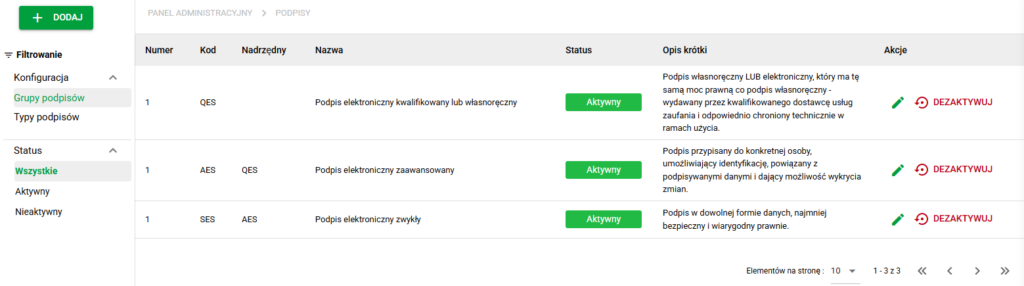
Signature groups is an entity that organizes the types of electronic signatures according to the level of security and legal consequences (SES, AES, QES).
2. Predefined signature groups
The system contains three basic groups of signatures:
SES – Simple Electronic Signature
Signature in any form of data. The least safe and with the lowest legal force.
AES – Advanced Electronic Signature
A signature assigned to a specific person, enabling identification of the signatory, linking it to the document and enabling the detection of changes.
QES – Qualified Electronic Signature
A qualified or handwritten signature, having the same legal force as a handwritten signature, issued by a qualified trust service provider.
3. "Groups" window - list and management
In the Groups view, the administrator can:
- view the list of signature groups,
- create new groups,
- edit existing ones,
- deactivate groups.
4. Managing signature groups
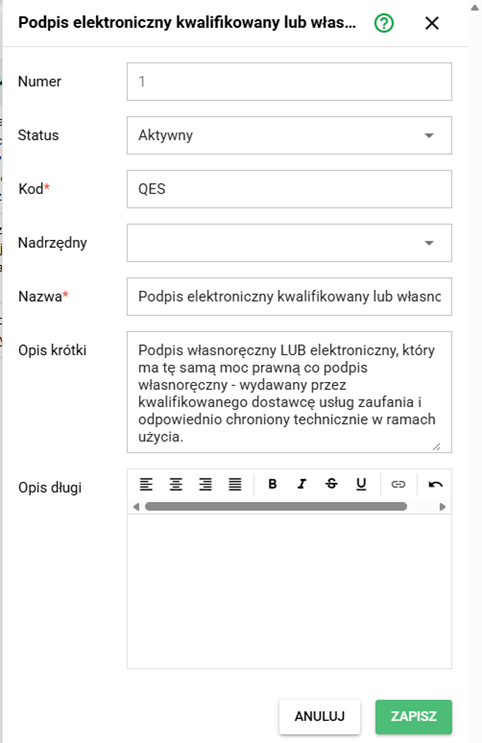
After entering editing or creating a group of signatures, the following are available:
- editing name and code (mandatory fields),
- status change (Active / Inactive),
- editing descriptions,
- parent group assignment.
Signature group fields
- Status: Active / Inactive
- No: display order
- Code: technical identifier (e.g. SES, AES, QES)
- Name (short text)
- Short description (text)
- Long description (rich text)
5. Possible signature group associations
Each signature group can be associated with multiple:
- signature types,
- document types.
Configuring the appropriate bindings is one of the important things when configuring Case Signatures.