Synchronizers
Zaktualizowano 2026-10-17
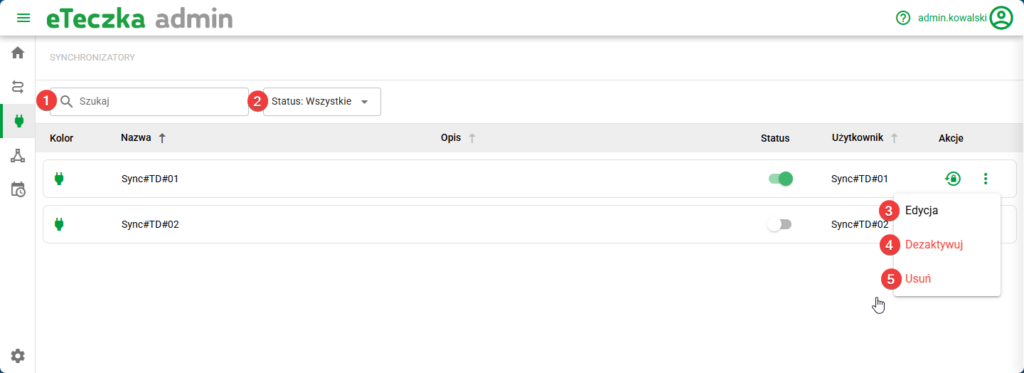
eFOB admin is a module built into eFOB for managing data synchronization processes. Synchronizers is a screen displaying a list of available connections to specific eFOBsync synchronizer instances.
Synchronizers are configured by Organization Administrators as part of the Data Flow creation functionality. On this screen you cannot create new synchronizer connections, only search and edit them.
Screen options
- Search – text search.
- Status Filter – ability to filter by status.
- Edit – description below.
- Deactivate / Activate – changes the Synchronizer Status to inactive / active. Inactive synchronizers are not activated.
- Remove – completely removes the data synchronizer and the possibility of using it.
Edit synchronizer
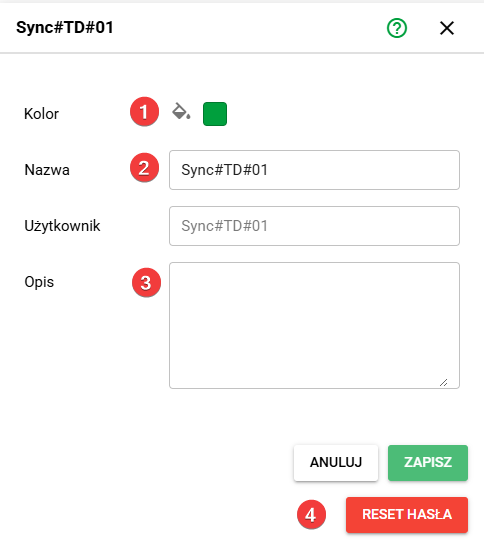
When you select the edit synchronizer option, the following options are available:
- Color – ability to change the color of the synchronizer for easy visual identification of the synchronizer (e.g. different colors for different administrators/key eFOBsync users).
- Name – ability to change the name of the synchronizer.
- Description – ability to add an additional detailed description of the synchronizer.
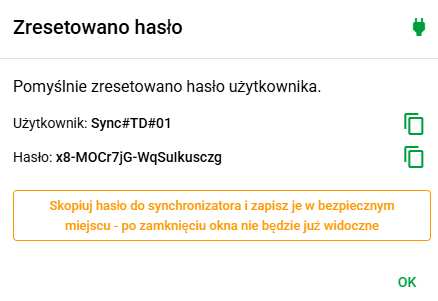
- Password Reset – option to change the password (API key) for the synchronizer User. After changing the password, the old password stops working and the screen below will be displayed once, allowing you to copy the new Password.