Synchronization concepts
Synchronization core components
eFOB admin is a module built into eFOB for managing data synchronization processes from the website level by the organization's administrator. eFOBSync as a local application running on the user's end enables regular data synchronization, including: employees, documents and more.
A task defines an operation configured by the organization administrator in eFOB admin. Examples include importing employee data using a selected schema or disabling user access in a supported integration.
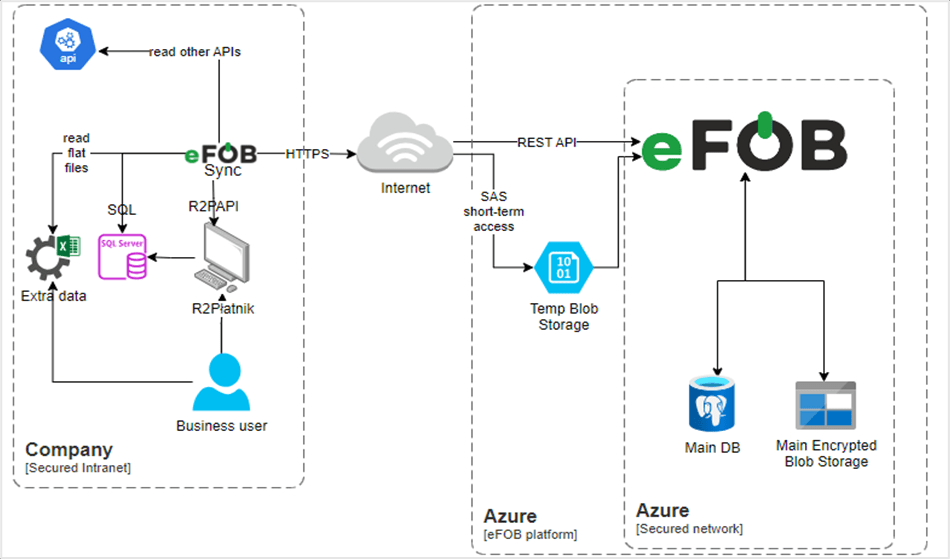
Diagram of eFOBSync components on the example of downloading data from Symfonia R2Płatnik / Excel / API
Available tasks depend on the integration and synchronizer type. In addition to importing employee data, selected integrations can disable user access after a contract ends. The setup for that task is described below.
Glossary
| Term | Concept | Definition |
|---|---|---|
| Data pipeline | Data flow | A collective request to synchronize data between a specific connection and eFOB in a specified schedule or one-time ad-hoc, without schedule. |
| Bucket | Group | Grouping of synchronization tasks in order to give them a priority for execution and execution conditions resulting from other tasks within a given group. |
| Task | Synchronization task | An operation performed in a flow group for its assigned companies, such as importing data using a schema or disabling user access in a supported integration. |
| Connector | Connection | Detailed information about the connection itself to the indicated system for data export to the indicated system synchronization. |
| Schedule | Schedule | A configurable schedule used to trigger data flow, indicating conditions that determine the timing of synchronization. |
| Schema | Schema | A data structure based on a Source and a Data Connection, and describing the columns in it and the types of Source data and mapping to Target data. |
| Data mapping | Data mapping | Associating individual data columns between two database structures (source and target). |
| Tenant mapping | Mapping companies | Linking the source company, for example from the HR and payroll system, to the Company in eFOB. This includes, among others, when creating a new flow. |
| Source | Source | The specified source fields that were exported from the specified data source. |
| Destination | Target | The specified target field into which the source data will be loaded using Mapping. |
| Sync | Synchronizer | An application embedded in the user's local environment that executes synchronization commands according to the instructions provided by the server. |
| Synchronization type | Synchronization type | Method data synchronization: - Update - adding new, unique records according to a specific mapping. - In the future, Full - replacing the indicated data. |
| Sync User | Synchronizer User | Technical user created automatically when the Synchronizer is launched by the Organization Administrator and assigned to a specific Organization and Synchronizer instance. Note: Typically this is a user with a name like Sync#123. Its password (API key) is independent of the password of the organization's administrator user. |
| Organization (eFOB) | Organization (eFOB) | A unit that groups companies according to the granted license, both in the option for one and many companies, in order to implement functionality such as assigning administrative users for all companies at the same time, common synchronizer settings for many companies, and in the future also licensing and invoicing processes. |
| Organization Admin | Organization Administrator | A user who has special rights to be the Administrator of the entire Organization for many Companies and can manage the Synchronizer. Can create/connect further synchronizer instances and create API/Sync Users. |
| Tenant (eFOB) | Company (eFOB) | An individual company belonging to only one organization for which synchronization takes place. |
Task groups, tasks and company mappings
A group connects tasks with the companies they apply to. Before running a task, check the company mappings in its group, particularly if you manage several companies within one organization.
End access after a contract finishes
The Deactivate users task helps end company access after employment finishes, without manually blocking each account. It is available for selected cloud integrations, currently Teta. It is not a general feature of every eFOBsync synchronizer.
The task disables access only to companies assigned to its group when the contract end date is earlier than the current date. It does not remove the user's account from every company in the organization.
Set up the task
- As an organization administrator, open eFOB admin and select the relevant data flow.
- Check the companies assigned to the group and the contract end dates imported from the source system.
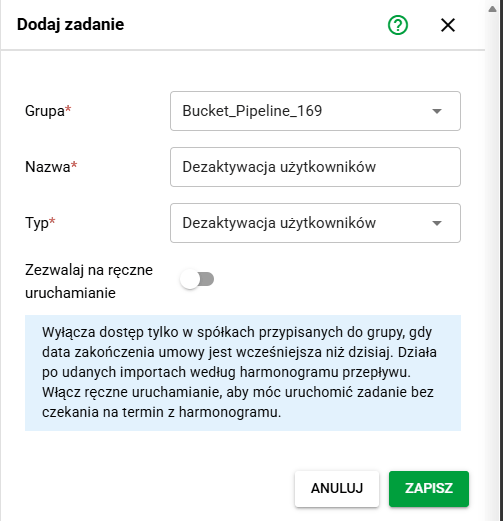
- Open the tasks for that group and select Add.
- Select the group, enter a name, and choose Deactivate users as the task type. This task does not require an import schema.
- Decide whether to enable Allow manual execution. It is off by default.
- Save the task and check that it is active.
If this task type is unavailable, check the integration type and your permissions. Do not substitute an employee import task.
Run the task and check the result
The task runs after successful imports according to the flow's schedule. Before its first run, check that contract data is up to date and the group covers the intended companies.
If the task is active and manual execution is enabled, you can select its Run action and confirm execution without waiting for the scheduled time. This changes user access, so check the company scope again before confirming.
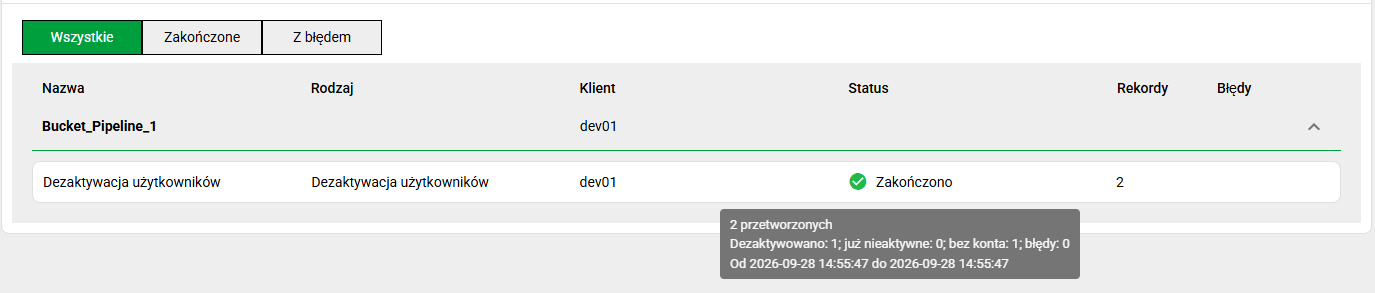
After execution, check the task status and summary in the flow history. The summary distinguishes deactivated accounts, accounts that were already inactive, records without an account, and errors. The number of processed records is not the number of accounts deactivated.