Data synchronization schemes
In this article, we will discuss in detail the schemes available in eFOB admin for synchronizing employee data from available HR and payroll systems, using the eFOBsync synchronizer, to the eFOB system.
Basic assumptions of synchronization
- Data is currently synchronized unilaterally, i.e. from the HR and payroll system to eFOB.
- New record data is created in eFOB.
- Data of changed records are updated in eFOB.
- Employee records deleted from the HR and payroll system ARE NOT deleted or updated in eFOB.
Supported systems
Currently, the following synchronizations are supported by eFOB:
- Symfonia R2Płatnik
- Symphony of HR and Payroll (KiP)
- HR and payroll systems based on MS SQL (e.g. Enova and Optima families)
- (Enterprise) HR and payroll systems based on TETA HR API
- Any systems that can create data in an MS SQL database (e.g. free MS SQL Express) – see last
Symfonia R2Płatnik
Note: currently eFOB only supports the “on-premise” version of R2Płatnik. If you need integration with Symfonia R2Płatnik in the "cloud" version, please contact the sales department.
Connection types in R2Płatnik
Two types of connections are supported for the Symfonia R2Płatnik system:
- MS SQL – connection at the database level, additionally allows (request to the support department required) configuration of restrictions on downloading employee data in SQL queries (so-called WHERE).
- API – connection at the R2PAPI level, currently downloads all employee records, eventually it will be possible as a two-way connection.
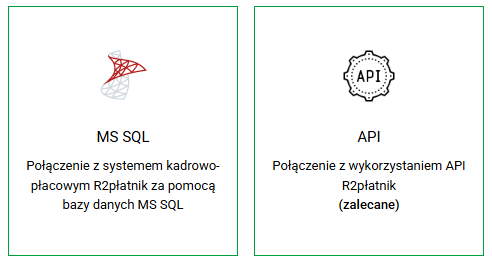
Symfonia R2Płatnik – MS SQL – “SQL Basic” schema
The "SQL Basic" schema is designed to synchronize basic employee data using SQL connections. It uses a previously defined SQL query.
Data scope and mapping
Below are the basic fields exported from the Symfonia R2Płatnik system and their mapping to the eFOB system:
| Pole Symfonia R2Płatnik | eFOB field in Employees |
|---|---|
| Employee ID (internal X_I) | External ID1 |
| ID | External ID2 |
| Name | Name |
| Surname | Surname |
| PESEL | PESEL |
| Document type a) 'Series and DO number' field – condition not empty b) field 'Passport' no - condition empty c) <<no mapping >> d) Field 'Foreigner' <> 'no' (comparison) | Document type a) ID card b) Passport c) Driving license (not supported) d) Other |
| Document number a) text from the 'Series and DO number' field b) text from the 'Passport' field c) <<no mapping>> d) text from the 'Document number' field or NIP' | Document number |
| Email (field K_E_mail from the ADDRESS table) | Personal email address |
| Date_employment | Contract start date (for Contract_o_works=1) |
| Release_date | Contract end date (for Contract_o_works=1) |
| ZFrom | Contract start date (for Agreement_zalenie=1 or Agreement_o_dzielo=1) |
| ZDo | Contract end date (for Agreement_zalenie=1 or Agreement_o_dzielo=1) |
| Work contract | 0 or 1 (not saved to eFOB, only used for the above conditions) |
| Contract_order | 0 or 1 (not saved to eFOB, only used for the above conditions) |
| Agreement_o_share | 0 or 1 (not saved to eFOB, only used for the above conditions) |
Symfonia R2Płatnik – MS SQL – “SQL Full” schema
The "SQL Full" schema enables the synchronization of the full range of employee data that has its equivalents in the eFOB system.
Data scope and mapping
The fields exported in this schema and their mapping in the eFOB system cover a wider range of information:
| R2Płatnik field | eFOB field in Employees |
|---|---|
| Employee ID (internal X_I) | External ID1 |
| ID | External ID2 |
| Name | Name |
| Middle name | Middle name |
| Surname | Surname |
| Family name | Maiden name |
| PESEL | PESEL |
| Date of birth | Date of birth |
| Place of birth | Place of birth |
| Marital status | Marital status |
| Gender | Gender |
| Nationality | Nationality |
| Mother's name | Mother's name |
| Father's name | Father's name |
| Document type a) 'Series and DO number' field – condition not empty b) field 'Passport' no - condition empty c) <<no mapping >> d) Field 'Foreigner' <> 'no' (comparison) | Document type a) ID card b) Passport c) Driving license (not supported) d) Other |
| Document number a) text from the 'Series and DO number' field b) text from the 'Passport' field c) <<no mapping>> d) text from the 'Document number' field or NIP' | Document number |
| Correspondence Address | 'Address details' section |
| Town | City |
| Postal code | Postal code |
| Street | Street name |
| House number | House number |
| Apartment number | Property number |
| District | District |
| County | County |
| Voivodeship | Voivodeship |
| Country | Country |
| Mobile phone | Mobile phone number |
| Telephone | Business phone number |
| Email (field K_E_mail from the ADDRESS table) | Personal email address |
| Date_employment | Contract start date (for Contract_o_works=1) |
| Release_date | Contract end date (for Contract_o_works=1) |
| ZFrom | Contract start date (for Agreement_zalenie=1 or Agreement_o_dzielo=1) |
| ZDo | Contract end date (for Agreement_zalenie=1 or Agreement_o_dzielo=1) |
| Work contract | 0 or 1 (not saved to eFOB, only used for the above conditions) |
| Contract_order | 0 or 1 (not saved to eFOB, only used for the above conditions) |
| Agreement_o_share | 0 or 1 (not saved to eFOB, only used for the above conditions) |
Symfonia R2Płatnik – API – “R2P Basic” scheme
The "R2P Basic" scheme is designed to synchronize basic employee data using the API of the Symfonia R2Płatnik system. Currently downloading all employee records
Data scope and mapping
| Pole Symfonia R2Płatnik | eFOB field in Employees |
|---|---|
| Employee ID (internal X_I) | External ID1 |
| Name | Name |
| Surname | Surname |
| PESEL | PESEL |
| Document type a) 'Series and DO number' field – condition not empty b) field 'Passport' no - condition empty c) <<no mapping >> d) Field 'Foreigner' <> 'no' (comparison) | Document type a) ID card b) Passport c) Driving license (not supported) d) Other |
| Document number a) text from the 'Series and DO number' field b) text from the 'Passport' field c) <<no mapping>> d) text from the 'Document number' field or NIP' | Document number |
Symfonia R2Płatnik – API – “R2P Full” scheme
Similarly to the SQL schema, the "R2P Max" schema for API connections enables the synchronization of the full range of employee data, using a defined data structure obtained by the Symfonia R2Płatnik API.
Data scope and mapping
| R2Płatnik field | eFOB field in Employees |
|---|---|
| Employee ID | External ID1 |
| Name | Name |
| Middle name | Middle name |
| Surname | Surname |
| Family name | Maiden name |
| PESEL | PESEL |
| Date of birth | Date of birth |
| Place of birth | Place of birth |
| Marital status | Marital status |
| Gender | Gender |
| Nationality | Nationality |
| Mother's name | Mother's name |
| Father's name | Father's name |
| Document type a) 'Series and DO number' field – condition not empty b) field 'Passport' no - condition empty c) <<no mapping >> d) Field 'Foreigner' <> 'no' (comparison) | Document type a) ID card b) Passport c) Driving license (not supported) d) Other |
| Document number a) text from the 'Series and DO number' field b) text from the 'Passport' field c) <<no mapping>> d) text from the 'Document number' field or NIP' | Document number |
| Correspondence Address | 'Address details' section |
| Town | City |
| Postal code | Postal code |
| Street | Street name |
| House number | House number |
| Apartment number | Property number |
| District | District |
| County | County |
| Voivodeship | Voivodeship |
| Country | Country |
| Mobile phone | Mobile phone number |
| Telephone | Business phone number |
| Personal email address |
Symfonia ERP HR and Payroll
Connection types
For the Symfonia Kadry i Płace (KiP) system, only one type of connection is supported at the database level:
Symfonia ERP HR and Payroll – MS SQL – “SQL Basic” schema
The "SQL Basic" schema is designed to synchronize basic employee data using SQL connections. It uses a previously defined SQL query. It assumes consistency in the database structure of various clients using the HR and Payroll applications.
Data scope and mapping
The fields exported from the system and their mapping to the eFOB system are shown below:
| KiP field | eFOB field in Employees |
|---|---|
| EmployeeID | External ID1 |
| Name1 | Name |
| Surname | Surname |
| PESEL | PESEL |
| Document type – from the VV_EMPLOYEES view && HRV_ITEM.definition_id = 8330 && HRV_ROW.definition_id = 8312 – only 'ID card' and 'passport' | Document type 1) ID card 2) Passport 3) Driving license (not supported) 4) Other (not supported) |
| Document number – from the VV_EMPLOYEES view && HRV_ITEM.definition_id = 8310 && HRV_ROW.definition_id = 8312 | Document number |
Symfonia ERP HR and Payroll – MS SQL – “SQL Full” schema
The "SQL Full" schema enables the synchronization of the full range of employee data that has its equivalents in the eFOB system.
Data scope and mapping
The fields exported in this schema and their mapping in the eFOB system cover a wider range of information:
| KiP field | eFOB field in Employees |
|---|---|
| EmployeeID | External ID1 |
| Name1 | Name |
| Name2 | Middle name |
| Surname | Surname |
| Family name – from the VV_EMPLOYEES view && HRV_ITEMS.definition_id = 8317 && HRV_ROWS.definition_id = 8316 | Maiden name |
| PESEL | PESEL |
| Date of birth – if date '1753-01-01' is empty | Date of birth |
| Place of birth – from the VV_EMPLOYEES view && HRV_ITEMS.definition_id = 8303 && HRV_ROWS.definition_id = 8319 | Place of birth |
| Marital status – if gender 'male' and 'spouse' -> 'married' – if gender 'woman' and 'spouse' -> 'married woman' – if gender only 'male' -> 'bachelor' – if gender only 'female' -> 'virgo' Spouse – from the VV_EMPLOYEES view && HRV_ITEMS.definition_id = 8329 && HRV_ROWS.definition_id = 8329 | Marital status |
| Gender – from the VV_EMPLOYEES view && HRV_ITEMS.definition_id = 8381 && HRV_ROWS.definition_id = 8381 | Gender |
| Nationality – from the VV_EMPLOYEES view && HRV_ITEMS.definition_id = 8331 && HRV_ROWS.definition_id = 8316 | Nationality |
| Mother's name – from the VV_EMPLOYEES view && HRV_ITEMS.definition_id = 8321 && HRV_ROWS.definition_id = 8319 | Mother's name |
| Father's name – from the VV_EMPLOYEES view && HRV_ITEMS.definition_id = 8320 && HRV_ROWS.definition_id = 8319 | Father's name |
| Document type – from the VV_EMPLOYEES view && HRV_ITEMS.definition_id = 8330 && HRV_ROWS.definition_id = 8312 – only 'ID card' and 'passport' | Document type 1) ID card 2) Passport 3) Driving license (not supported) 4) Other (not supported) |
| Document number – from the VV_EMPLOYEES view && HRV_ITEMS.definition_id = 8310 && HRV_ROWS.definition_id = 8312 | Document number |
| Correspondence Address | 'Address details' section |
| Town – from the VV_EMPLOYEES view && HRV_ITEMS.definition_id = 8303 && HRV_ROWS.definition_id = 8309 | City |
| Postal code – from the VV_EMPLOYEES view && HRV_ITEMS.definition_id = 8304 && HRV_ROWS.definition_id = 8309 | Postal code |
| Street – from the VV_EMPLOYEES view && HRV_ITEMS.definition_id = 8300 && HRV_ROWS.definition_id = 8309 | Street name |
| House number – from the VV_EMPLOYEES view && HRV_ITEMS.definition_id = 8301 && HRV_ROWS.definition_id = 8309 | House number |
| Apartment no – from the VV_EMPLOYEES view && HRV_ITEMS.definition_id = 8302 && HRV_ROWS.definition_id = 8309 | Property number |
| District – from the VV_EMPLOYEES view && HRV_ITEMS.definition_id = 8306 && HRV_ROWS.definition_id = 8309 | District |
| County – from the VV_EMPLOYEES view && HRV_ITEMS.definition_id = 8332 && HRV_ROWS.definition_id = 8309 | County |
| Voivodeship – from the VV_EMPLOYEES view && HRV_ITEMS.definition_id = 8307 && HRV_ROWS.definition_id = 8309 | Voivodeship |
| Country – from the VV_EMPLOYEES view && HRV_ITEMS.definition_id = 8308 && HRV_ROWS.definition_id = 8309 | Country |
| Mobile phone – from the VV_EMPLOYEES view && HRV_ITEMS.definition_id = 14512 && HRV_ROWS.definition_id = 14512 | Mobile phone number |
| Telephone – from the VV_EMPLOYEES view && HRV_ITEMS.definition_id = 14511 && HRV_ROWS.definition_id = 14511 | Business phone number |
| Email – from the VV_EMPLOYEES view && HRV_ITEMS.definition_id = 14513 && HRV_ROWS.definition_id = 14513 | Personal email address |
Any systems that provide data in MS SQL
1. Entry
The document describes the complete process of preparing an intermediate SQL Server database enabling the synchronization of employee data to eFOBSync without modifying the integration tools. The solution assumes:
- creation of two databases (BIN and DANE),
- creation of staging tables powered by the client's system and views identical in structure to the previously described R2Płatnik.
2. Architectural assumptions
- eFOBSync communicates with two separate databases: BIN (company list) and DANE (employee data).
- Database names must follow the convention: R2P_<database_name>_bin and R2P_<database_name>_data_<company id>.
- eFOBSync queries objects with fixed names: COMPANY, EMPLOYEE, EMPLOYEE.
- Source data can be stored in any staging tables - only views mapping them to the R2P contract are required.
3. Installation and configuration of MS SQL (Express) – proposal
The staging database can run on any Microsoft SQL Server instance, including the free version of Microsoft SQL Server Express.
By default, the R2P installer: – installs SQL Server Express, – creates an instance called SYMFONIAR2P, – enables SQL Server Authentication logging, – creates an account login: sa with the default password.
However, this is not required. The customer can independently: – install Microsoft SQL Server (Express or higher edition), – choose any instance name, – configure your own SQL account or use an existing one, – set your own passwords and security policies.
4. Creation of databases
You need to create two SQL Server databases:
CREATE DATABASE [R2P_platnik10_bin];
GO
CREATE DATABASE [R2P_platnik10_dane_1];
GO
4a. BIN database setup – list of companies
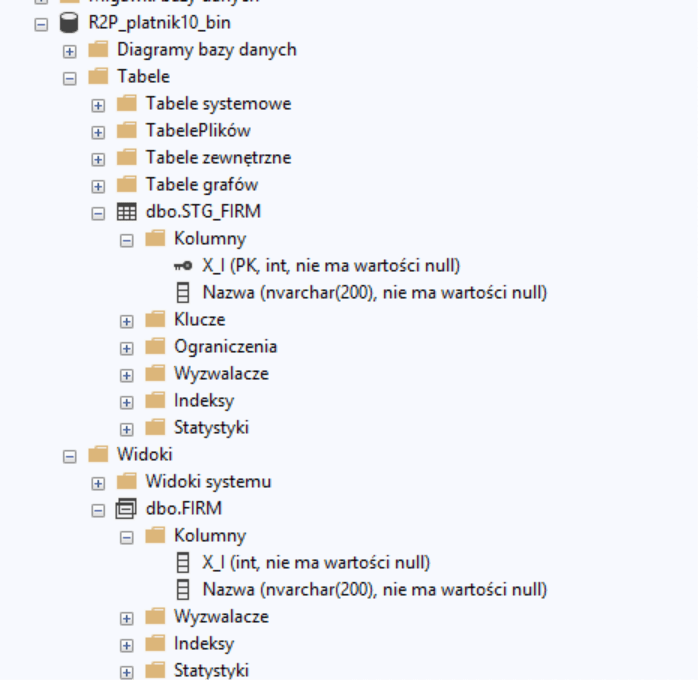
In the BIN database, you need to create staging tables and a FIRM view that will be read by eFOBsync.
USE [R2P_platnik10_bin];
GO

CREATE TABLE dbo.STG_FIRM (
  X_I   INT NOT NULL PRIMARY KEY,
  Nazwa NVARCHAR(200) NOT NULL
);
GO

CREATE VIEW dbo.FIRM AS
SELECT X_I, Nazwa
FROM dbo.STG_FIRM;
GO
What should the BIN database look like?
4b. Database setup DATA – actual data (Basic version):
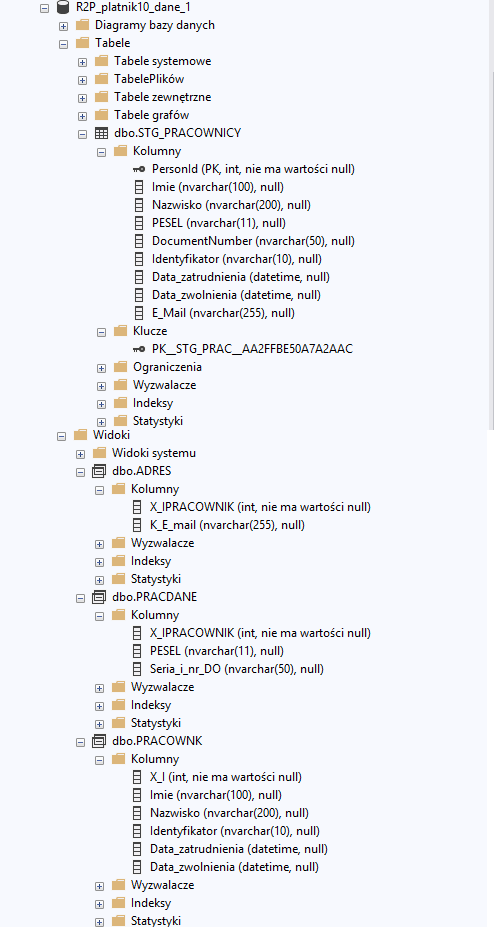
In the DATA database, you should create one staging table powered by the client's system and two views mapping the Symfonia R2Płatnik structure.
USE [R2P_platnik10_dane_1];
GO

CREATE TABLE dbo.STG_PRACOWNICY (
  PersonId           INT NOT NULL PRIMARY KEY,
  Imie               NVARCHAR(100) NULL,
  Nazwisko           NVARCHAR(200) NULL,
  PESEL              NVARCHAR(11) NULL,
  DocumentNumber     NVARCHAR(50) NULL,
  Identyfikator      NVARCHAR(10) NULL,
  Data_zatrudnienia  DATETIME NULL,
  Data_zwolnienia    DATETIME NULL,
  E_Mail             NVARCHAR(120) NOT NULL
);
GO

CREATE OR ALTER VIEW dbo.PRACOWNK AS
SELECT
  PersonId AS X_I,
  Imie,
  Nazwisko,
  Identyfikator,
  Data_zatrudnienia,
  Data_zwolnienia,
  NULL as ZDo,
  NULL as ZOd,
  1 as Umowa_o_prace,
  0 as Umowa_zlecenie,
  0 as Umowa_o_dzielo
FROM dbo.STG_PRACOWNICY;
GO

CREATE VIEW dbo.PRACDANE AS
SELECT
  PersonId AS X_IPRACOWNIK,
  PESEL,
  DocumentNumber AS Seria_i_nr_DO
FROM dbo.STG_PRACOWNICY;
GO

CREATE VIEW dbo.ADRES AS
SELECT
  PersonId AS X_IPRACOWNIK,
  E_Mail AS K_E_mail
FROM dbo.STG_PRACOWNICY;
GO
What should the DATA database look like after performing the above queries?
5. Data contract and concluding remarks
The FIRM view must return columns:
- X_I
- Nazwa

The PRACOWNK view must return columns:
- X_I
- Imie
- Nazwisko
- Identyfikator
- Data_zatrudnienia
- Data_zwolnienia
and technical columns:
- NULL as ZDo
- NULL as ZOd
- 1 as Umowa_o_prace
- 0 as Umowa_zlecenie
- 0 as Umowa_o_dzielo

The PRACDANE view must return columns:
- X_IPRACOWNIK
- PESEL
- Seria_i_nr_DO

The ADRESY view must contain columns:
- X_IPRACOWNIK,
- K_E_mail
Note: eFOBSync does not require knowledge of the structure of staging tables. Any changes on the client side can be handled by modifying views, without interfering with the configuration or integration code.
6. eFOB admin configuration
In the R2P source configuration in eFOB admin you should set: – server: address of the SQL Server instance – database_name: platnik10 – database: 1
Based on these values, eFOBsync will automatically connect to the databases: – R2P_platnik10_bin – R2P_platnik10_data_1
7. Connection configuration in eFOBsync
Access data to SQL Server must be entered in the data source configuration in eFOBsync.
In the connection configuration, please complete:
- database host name (e.g. localhost),
- port (default 1433),
- SQL Server instance name,
- name of the logical database (database_name),
- SQL user login details.eFOBsync uses this information only to establish a connection to the intermediate database. There is no requirement to use a default instance or default installer account.