Dictionaries
Dictionaries
The Dictionaries module allows an authorized user to configure many data in the system. It allows you to add and manage the database of: Folders, Customers, Projects, Positions and Cases.
To go to dictionaries, select Administration Panel -> Dictionaries. We can see all dictionaries in the side menu on the left side of the screen.
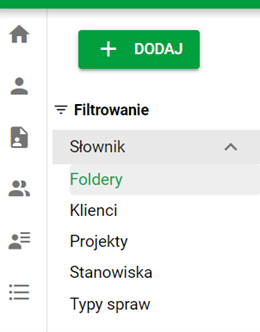
Dictionary filter
Folders
Folders are structures used to organize and store documents in the system. They enable hierarchical grouping of files according to specific categories, which makes them easier to manage. Folders can contain subfolders, allowing you to further refine your document structure.
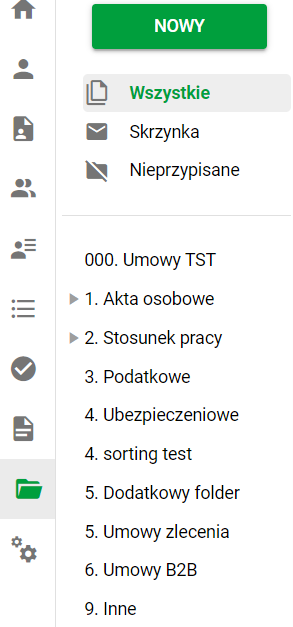
Documents. Folders in the side menu
Default folder configuration: In the system, folders are initially configured as follows:
- Personal file
- Employment relationship
- Tax
- Insurance
- Other
Folders are used in the Documents module, which allows you to easily assign documents to appropriate folders.
Document creation: New documents can be created using the ADD button located in the upper left corner of the side menu.
Folder fields:
- Document Retention: Folders can be configured with document retention rules, allowing you to automatically manage document retention dates.
- Folder Status: Folders can have a status of Active or Inactive.
- Parent Folder: Folders can be associated with a parent folder, allowing you to create a complex hierarchy.
- Folder code: Each folder can be assigned a unique code.
- Document Type: Folders can be associated with a specific document type, making it easier to organize and classify files.
- Subfolder Naming: You can configure subfolder naming according to your organization's needs.
Customers
In the system, the client represents the entity with which we cooperate on projects.
It can have various states that reflect the current stage of cooperation, and a status that determines its activity. The customer is associated with an address that identifies the company's location or headquarters.
Assignment to projects: The client can be assigned to a project in the system, which allows easy management of relationships and documentation related to a given project.
Client Condition:
- Interested – a client with whom negotiations have started, but no contract has been concluded yet.
- Opportunity – a client with whom it is possible to conclude a contract in the future.
- Agreement – the client with whom an agreement was concluded and cooperation began.
- Rejected – a client with whom cooperation has been ended or not established.
- Completed – cooperation with the client has been completed.
Customer status:
- Active – the client is active, cooperation is in progress.
- Inactive – the client is not active, cooperation has been suspended or ended.
The customer may be of different types depending on the type of contract: B2B (business-to-business), B2C (business-to-consumer), C2B (consumer-to-business), C2C (consumer-to-consumer) or internal (e.g. a department in the company).
Projects
A project is an organized undertaking that aims to achieve a specific goal within a specific period of time.
Projects play a central role in managing tasks in an organization. They enable planning, tracking progress, assigning resources and monitoring results. By assigning projects to employees, clients and specific dates, the system supports the efficiency and organization of activities.
Project data:
- Client – the project is assigned to a specific client, which allows activities to be linked to business relationships.
- Description – a short description of the project that presents the purpose and scope of work.
- Start date – project start date.
- End date – the expected or actual completion date of the project.
- Manager – a person responsible for the entire project and supervising its implementation.
- Junior manager – a person supporting the project manager, responsible for specific areas of the project.
- Address details – address of the client or location related to the project, including street, city, postal code.
Project status: Projects can have one of the following statuses:
- Active – the project is in progress.
- Inactive – the project has been suspended or completed.
Project status: Projects can take one of the following states:
- Current – the project is in the current phase of implementation.
- Idea – the project is in the initial phase, being considered as a possible initiative.
- Requested – the project has been submitted for implementation and is awaiting a decision.
- Planned – the project is planned, but has not been launched yet.
- Approved – the project has been approved for implementation.
- Rejected – the project has been rejected and will not be implemented.
- Suspended – the project has been paused but not completed.
- Completed – the project has been completed, all tasks have been completed.
Project type: Projects can be of one of the following types:
- Consulting – a project related to providing advice and support.
- Delivery – a project involving the delivery of goods or services.
- Outsourcing – a project under which services are outsourced to external entities.
- Operational – a project related to the current operational activities of the organization.
- Testing – a project involving testing of products or services before their implementation.
Positions
A position is a specific task or role assigned to an employee in an organization. Positions are used to define employee responsibilities in the system, which allows for easier management of roles and organizational structure.
Assigning a position when creating an employee
- Assignment to employees – a position can be assigned to a specific employee in the system, which allows for monitoring his or her roles and responsibilities.
- Position status – positions may have a status of Active or Inactive, depending on whether they are currently assigned to an employee and performed within the organization.
- Document types – depending on the position, specific types of documents may be assigned to which the employee has access or responsibility.
Case Types
Issue types are categories that are used to classify and manage various issues related to employees or candidates.Case types can include employee applications, document completion and document circulation issues.